> ## Documentation Index
> Fetch the complete documentation index at: https://benchgen.com/docs/llms.txt
> Use this file to discover all available pages before exploring further.
# Agent-to-Agent (A2A) Connection
> Step-by-step guide to connecting your Agentspace agent using the SSE protocol.
# Agent-to-Agent (A2A) Connection Guide
This guide provides a step-by-step walkthrough for connecting your Agentspace agent as an agent using the SSE (Server-Sent Events) protocol.
## Overview
The Agent-to-Agent protocol enables standardized communication between AI agents through:
* **Agent Discovery**: Retrieve agent metadata and capabilities
* **SSE Streaming**: Real-time bidirectional communication
* **Context Management**: Maintain conversation history across messages
***
## Prerequisites
Before you begin, ensure you have:
* Your agent deployed and accessible on Agentspace
* A tool to make HTTP requests (curl, Postman, or a programming language HTTP client)
* Ability to handle Server-Sent Events (SSE) streams
### A2A Inspector Tool
For testing and validating your A2A connections, we recommend using the **A2A Inspector** - an open-source tool that helps you:
* Validate agent cards and their structure
* Test SSE streaming connections
* Debug agent conversations in real-time
* Visualize message flow and responses
**GitHub Repository:** [https://github.com/a2aproject/a2a-inspector](https://github.com/a2aproject/a2a-inspector)
***
## Step 1: Get the Agent Card URL
The agent card is a JSON document that describes your agent's capabilities, supported protocols, and available endpoints. It follows the standardized `.well-known/agent.json` convention.
### Agent Card URL Structure
```
https://{host-domain}/discovery/{agent-id}/.well-known/agent.json
```
### How to Obtain
1. Navigate to your Agentspace My Agents
2. Click the link below your deployed agent to open agent details page in new tab
3. Copy the agent card URL from the API Documentation tab
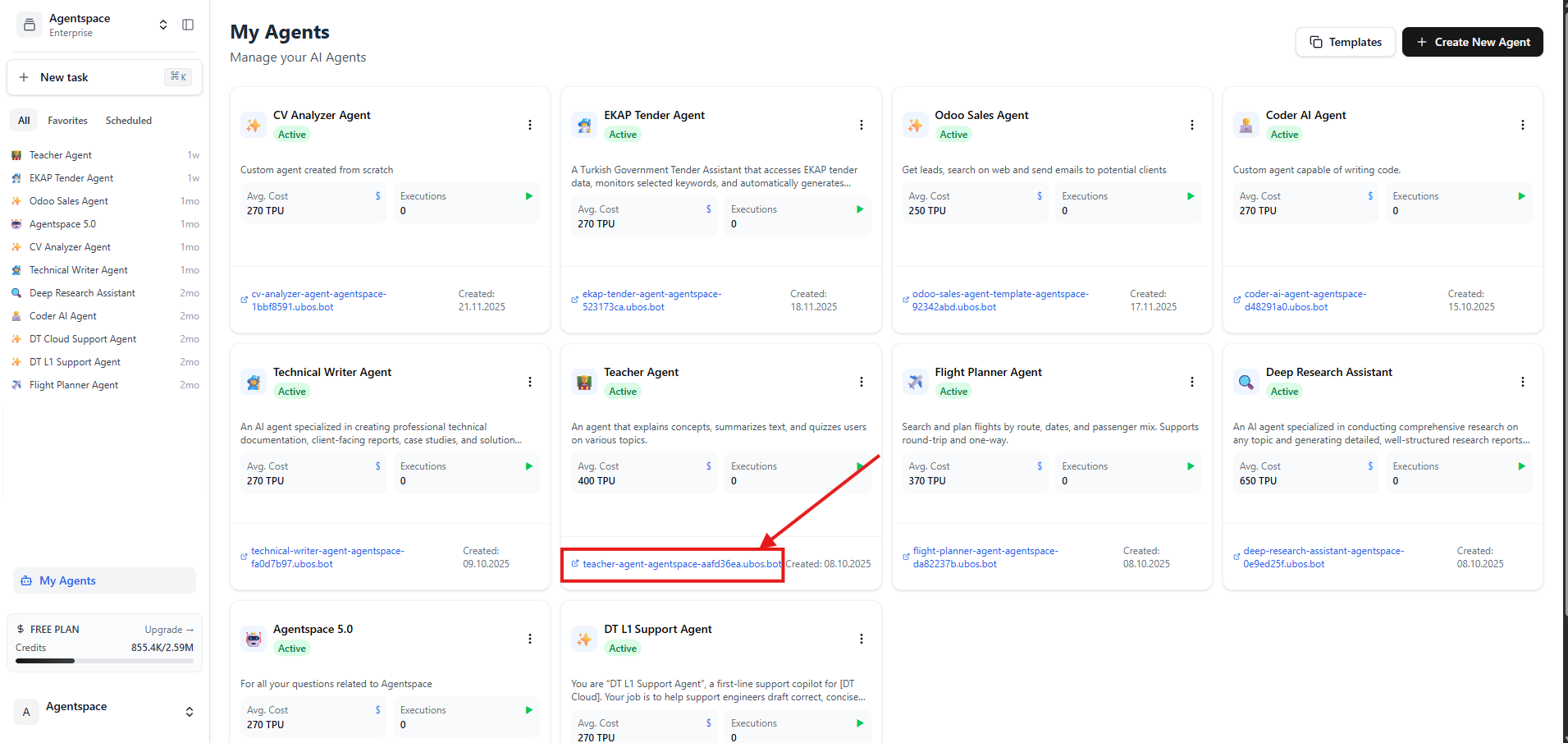 *Figure 1: Click the link below your agent to open the agent details page in new tab*
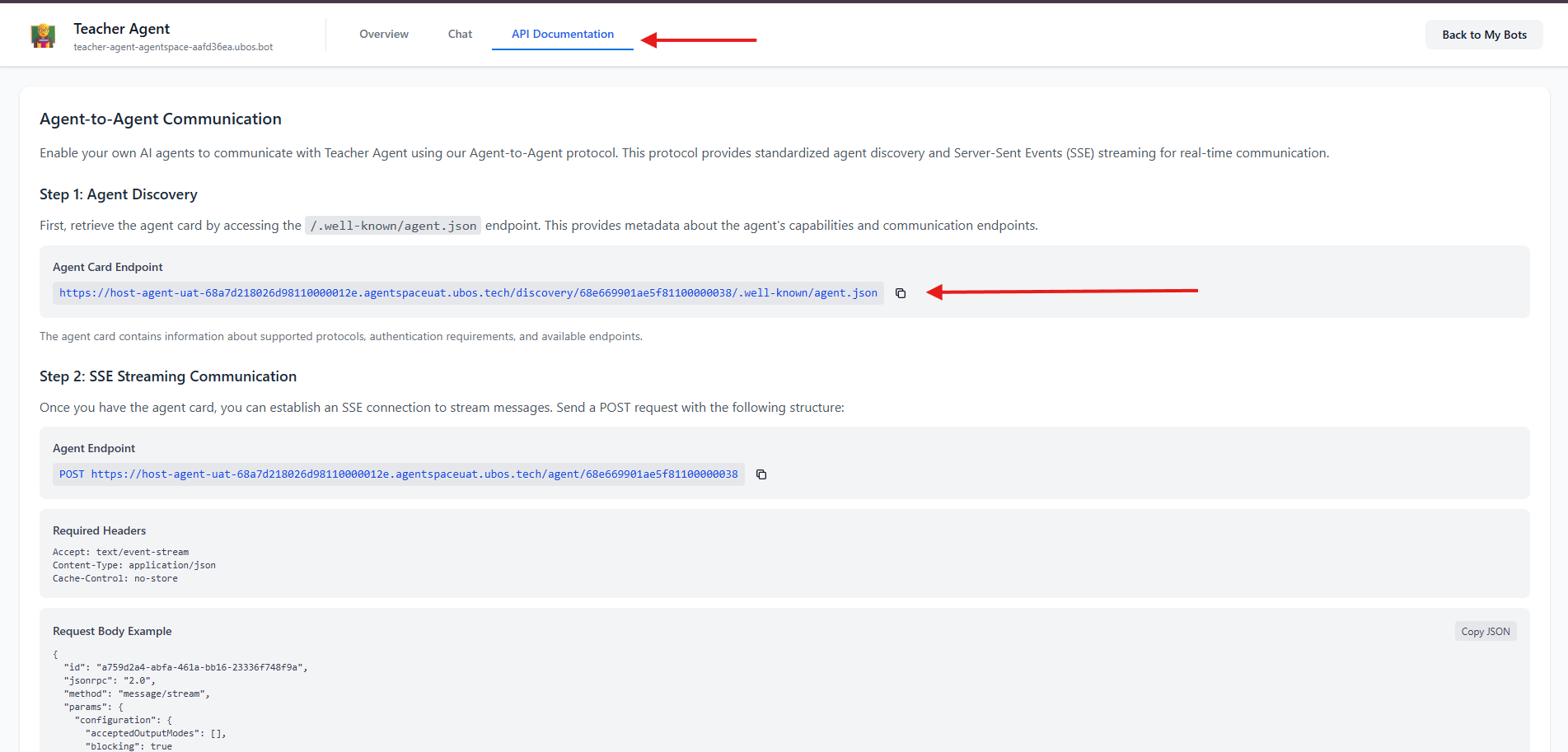 *Figure 2: Click API Documentation on the new tab to access Agent Card Endpoint*
***
## Step 2: Discover Agent Card and Add Agent
### Make a GET Request
#### Using curl
```bash theme={null}
curl -X GET "{your-agent-card-url}" \
-H "Accept: application/json"
```
#### Using JavaScript/Node.js
```javascript theme={null}
const agentCardUrl = "{your-agent-card-url}";
fetch(agentCardUrl)
.then(response => response.json())
.then(agentCard => console.log(agentCard))
.catch(error => console.error('Error:', error));
```
### Understanding the Agent Card Response
```json theme={null}
{
"name": "Teacher Agent",
"description": "An agent that explains concepts, summarizes text, and quizzes users on various topics.",
"version": "1.0.0",
"url": "https://{host-domain}/agent/{agent-id}",
"protocolVersion": "0.3.0",
"capabilities": {
"streaming": true,
"pushNotifications": false
},
"defaultInputModes": ["text"],
"defaultOutputModes": ["text"],
"skills": [
{
"description": "Use this tool when you want to understand any topic, from simple to complex.",
"examples": ["Explain quantum computing like I'm 12."],
"name": "Explain_Concept"
}
]
}
```
**Key fields:**
* `name`: The agent's display name
* `url`: The endpoint for sending messages (use this in Step 3)
* `description`: Used by host agent to choose when to call this agent
* `version`: Agent version
*Figure 2: Click API Documentation on the new tab to access Agent Card Endpoint*
***
## Step 2: Discover Agent Card and Add Agent
### Make a GET Request
#### Using curl
```bash theme={null}
curl -X GET "{your-agent-card-url}" \
-H "Accept: application/json"
```
#### Using JavaScript/Node.js
```javascript theme={null}
const agentCardUrl = "{your-agent-card-url}";
fetch(agentCardUrl)
.then(response => response.json())
.then(agentCard => console.log(agentCard))
.catch(error => console.error('Error:', error));
```
### Understanding the Agent Card Response
```json theme={null}
{
"name": "Teacher Agent",
"description": "An agent that explains concepts, summarizes text, and quizzes users on various topics.",
"version": "1.0.0",
"url": "https://{host-domain}/agent/{agent-id}",
"protocolVersion": "0.3.0",
"capabilities": {
"streaming": true,
"pushNotifications": false
},
"defaultInputModes": ["text"],
"defaultOutputModes": ["text"],
"skills": [
{
"description": "Use this tool when you want to understand any topic, from simple to complex.",
"examples": ["Explain quantum computing like I'm 12."],
"name": "Explain_Concept"
}
]
}
```
**Key fields:**
* `name`: The agent's display name
* `url`: The endpoint for sending messages (use this in Step 3)
* `description`: Used by host agent to choose when to call this agent
* `version`: Agent version
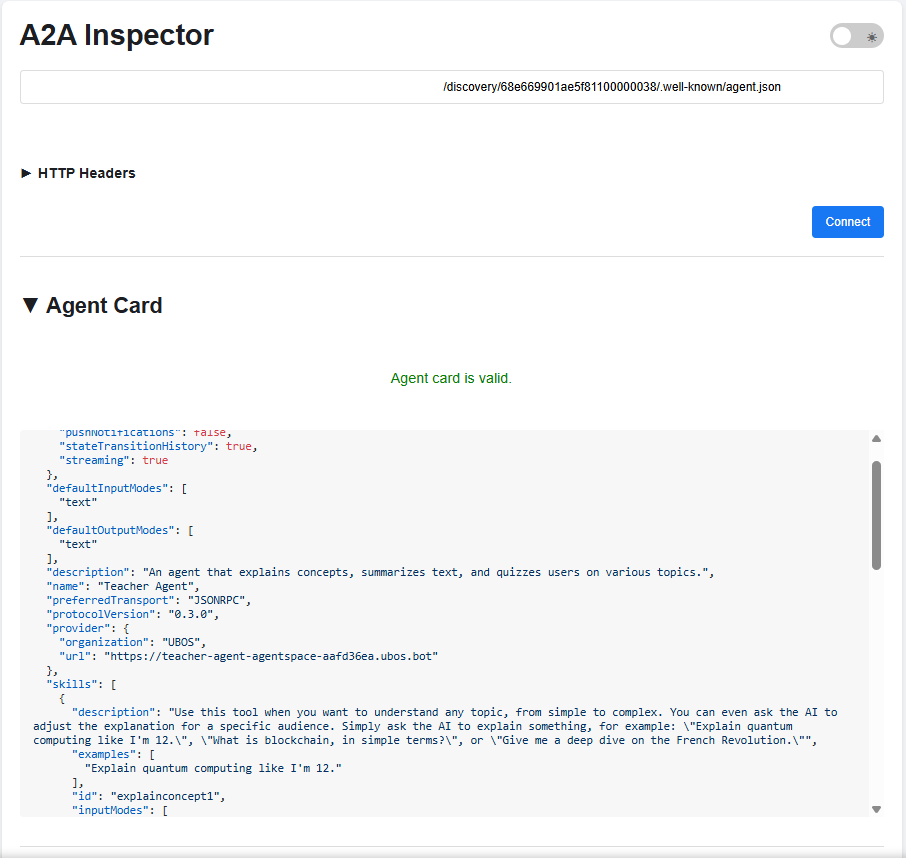 *Figure 3: Sample Agent Card JSON Response using A2A inspector*
***
## Step 3: Send Messages via SSE Streaming
Use the `url` from your agent card response:
```
POST {agent-url-from-card}
```
### Required Headers
```http theme={null}
Accept: text/event-stream
Content-Type: application/json
Cache-Control: no-store
```
### Request Body Structure
```json theme={null}
{
"id": "{unique-request-id}",
"jsonrpc": "2.0",
"method": "message/stream",
"params": {
"configuration": {
"acceptedOutputModes": [],
"blocking": true
},
"message": {
"contextId": "{conversation-context-id}",
"kind": "message",
"messageId": "{unique-message-id}",
"parts": [
{
"kind": "text",
"text": "Your message here"
}
],
"role": "user"
}
}
}
```
### Field Descriptions
| Field | Description | Required | Notes |
| ------------------------------- | -------------------------- | -------- | ------------------------------------------------- |
| `id` | Unique request identifier | Yes | Generate a new UUID for each request |
| `jsonrpc` | JSON-RPC version | Yes | Always `"2.0"` |
| `method` | RPC method name | Yes | Use `"message/stream"` for SSE |
| `params.configuration.blocking` | Wait for complete response | Yes | `true` for synchronous, `false` for async |
| `params.message.contextId` | Conversation context ID | Yes | Keep the same ID to maintain conversation history |
| `params.message.messageId` | Unique message identifier | Yes | Generate a new UUID for each message |
| `params.message.parts` | Message content array | Yes | Can contain text, images, or other content types |
| `params.message.role` | Message sender role | Yes | Typically `"user"` or `"assistant"` |
*Figure 3: Sample Agent Card JSON Response using A2A inspector*
***
## Step 3: Send Messages via SSE Streaming
Use the `url` from your agent card response:
```
POST {agent-url-from-card}
```
### Required Headers
```http theme={null}
Accept: text/event-stream
Content-Type: application/json
Cache-Control: no-store
```
### Request Body Structure
```json theme={null}
{
"id": "{unique-request-id}",
"jsonrpc": "2.0",
"method": "message/stream",
"params": {
"configuration": {
"acceptedOutputModes": [],
"blocking": true
},
"message": {
"contextId": "{conversation-context-id}",
"kind": "message",
"messageId": "{unique-message-id}",
"parts": [
{
"kind": "text",
"text": "Your message here"
}
],
"role": "user"
}
}
}
```
### Field Descriptions
| Field | Description | Required | Notes |
| ------------------------------- | -------------------------- | -------- | ------------------------------------------------- |
| `id` | Unique request identifier | Yes | Generate a new UUID for each request |
| `jsonrpc` | JSON-RPC version | Yes | Always `"2.0"` |
| `method` | RPC method name | Yes | Use `"message/stream"` for SSE |
| `params.configuration.blocking` | Wait for complete response | Yes | `true` for synchronous, `false` for async |
| `params.message.contextId` | Conversation context ID | Yes | Keep the same ID to maintain conversation history |
| `params.message.messageId` | Unique message identifier | Yes | Generate a new UUID for each message |
| `params.message.parts` | Message content array | Yes | Can contain text, images, or other content types |
| `params.message.role` | Message sender role | Yes | Typically `"user"` or `"assistant"` |
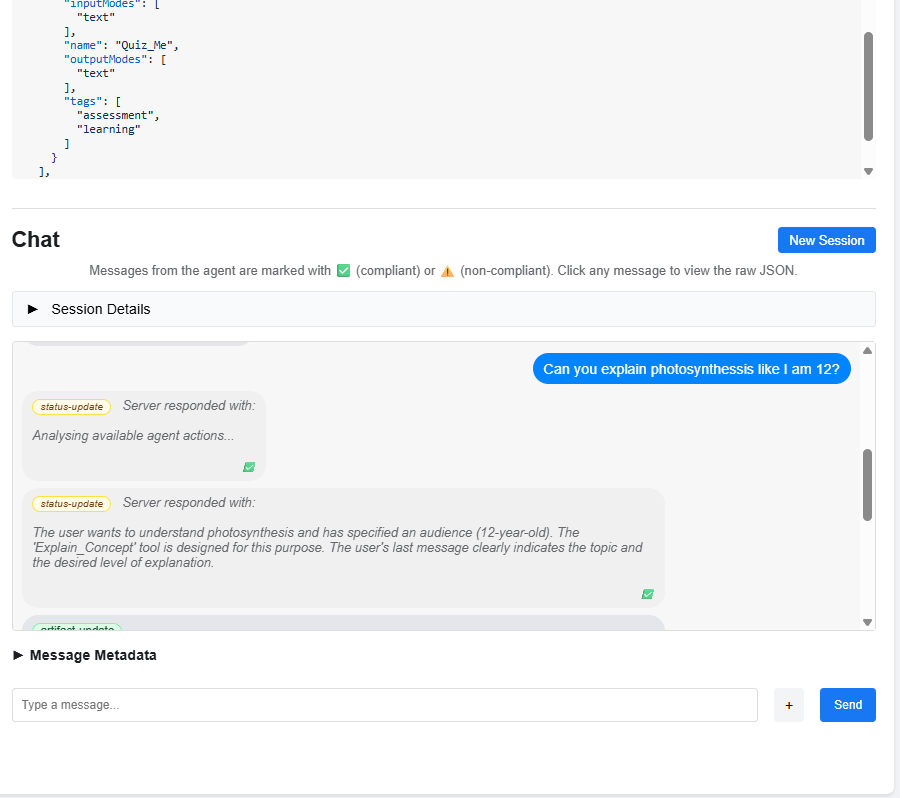
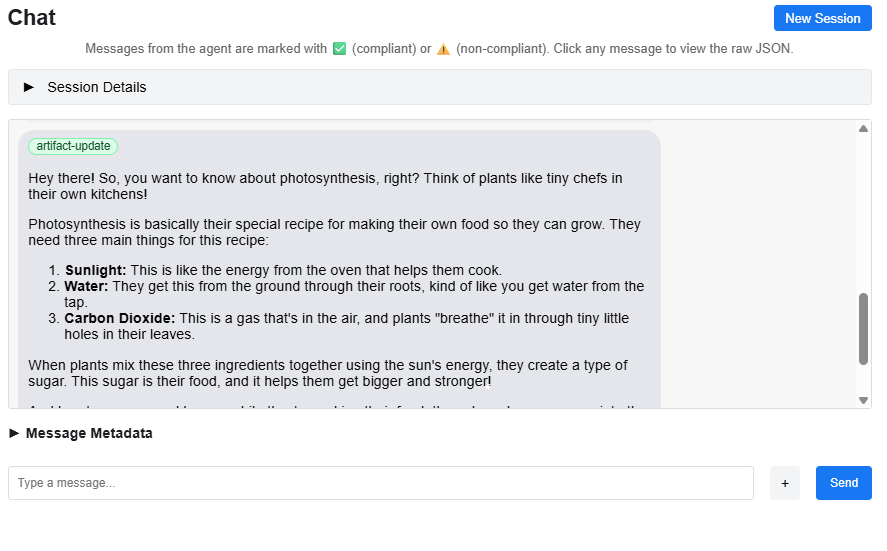 *Figure 4-5: Conversation with status-updates and artifacts using A2A Inspector*
### Complete JavaScript/Node.js Example
```javascript theme={null}
const fetch = require('node-fetch');
const { v4: uuidv4 } = require('uuid');
const agentEndpoint = "{agent-url-from-card}";
const requestId = uuidv4();
const contextId = uuidv4(); // Keep this for conversation continuity
const messageId = uuidv4();
const payload = {
id: requestId,
jsonrpc: "2.0",
method: "message/stream",
params: {
configuration: {
acceptedOutputModes: [],
blocking: true
},
message: {
contextId: contextId,
kind: "message",
messageId: messageId,
parts: [{ kind: "text", text: "What is the capital of France?" }],
role: "user"
}
}
};
fetch(agentEndpoint, {
method: 'POST',
headers: {
'Accept': 'text/event-stream',
'Content-Type': 'application/json',
'Cache-Control': 'no-store'
},
body: JSON.stringify(payload)
})
.then(response => {
const reader = response.body;
reader.on('data', (chunk) => {
const lines = chunk.toString().split('\n');
lines.forEach(line => {
if (line.startsWith('data: ')) {
try {
const parsed = JSON.parse(line.substring(6));
if (parsed.kind === 'status-update') {
console.log('Status:', parsed.status.state);
} else if (parsed.kind === 'artifact-update') {
console.log('Response:', parsed.artifact.parts[0].text);
}
} catch (e) {}
}
});
});
reader.on('end', () => console.log('Stream ended'));
})
.catch(error => console.error('Error:', error));
```
***
## Understanding SSE Responses
### Common Response Types
#### Status Update
```json theme={null}
{
"kind": "status-update",
"contextId": "{context-id}",
"taskId": "{task-id}",
"final": false,
"status": {
"state": "working",
"timestamp": "{timestamp}",
"message": {
"kind": "message",
"messageId": "{msg-id}",
"role": "agent",
"parts": [{ "kind": "text", "text": "Processing your request..." }]
}
}
}
```
#### Artifact Update
```json theme={null}
{
"kind": "artifact-update",
"contextId": "{context-id}",
"taskId": "{task-id}",
"artifact": {
"artifactId": "{artifact-id}",
"name": "agent_response",
"parts": [{ "kind": "text", "text": "The capital of France is Paris..." }]
}
}
```
### Response Type Summary
| Response Type | `kind` Value | Purpose |
| --------------- | ----------------- | --------------------------- |
| Status Update | `status-update` | Progress and reasoning |
| Artifact Update | `artifact-update` | The actual answer or output |
***
## Multi-Turn Conversations
To maintain conversation context, **use the same `contextId`** across multiple messages:
```javascript theme={null}
const contextId = uuidv4();
// First message
sendMessage(contextId, "What is the capital of France?");
// Follow-up message (same contextId)
sendMessage(contextId, "What about its population?");
```
Create a **new `contextId`** to start a fresh conversation.
***
## Best Practices
* **Always generate unique UUIDs** for `id` (per request) and `messageId` (per message).
* **Re-use `contextId`** within a conversation to preserve history.
* Handle both `status-update` and `artifact-update` events in your stream processor.
* Implement connection pooling and rate limiting when scaling your integration.
*Figure 4-5: Conversation with status-updates and artifacts using A2A Inspector*
### Complete JavaScript/Node.js Example
```javascript theme={null}
const fetch = require('node-fetch');
const { v4: uuidv4 } = require('uuid');
const agentEndpoint = "{agent-url-from-card}";
const requestId = uuidv4();
const contextId = uuidv4(); // Keep this for conversation continuity
const messageId = uuidv4();
const payload = {
id: requestId,
jsonrpc: "2.0",
method: "message/stream",
params: {
configuration: {
acceptedOutputModes: [],
blocking: true
},
message: {
contextId: contextId,
kind: "message",
messageId: messageId,
parts: [{ kind: "text", text: "What is the capital of France?" }],
role: "user"
}
}
};
fetch(agentEndpoint, {
method: 'POST',
headers: {
'Accept': 'text/event-stream',
'Content-Type': 'application/json',
'Cache-Control': 'no-store'
},
body: JSON.stringify(payload)
})
.then(response => {
const reader = response.body;
reader.on('data', (chunk) => {
const lines = chunk.toString().split('\n');
lines.forEach(line => {
if (line.startsWith('data: ')) {
try {
const parsed = JSON.parse(line.substring(6));
if (parsed.kind === 'status-update') {
console.log('Status:', parsed.status.state);
} else if (parsed.kind === 'artifact-update') {
console.log('Response:', parsed.artifact.parts[0].text);
}
} catch (e) {}
}
});
});
reader.on('end', () => console.log('Stream ended'));
})
.catch(error => console.error('Error:', error));
```
***
## Understanding SSE Responses
### Common Response Types
#### Status Update
```json theme={null}
{
"kind": "status-update",
"contextId": "{context-id}",
"taskId": "{task-id}",
"final": false,
"status": {
"state": "working",
"timestamp": "{timestamp}",
"message": {
"kind": "message",
"messageId": "{msg-id}",
"role": "agent",
"parts": [{ "kind": "text", "text": "Processing your request..." }]
}
}
}
```
#### Artifact Update
```json theme={null}
{
"kind": "artifact-update",
"contextId": "{context-id}",
"taskId": "{task-id}",
"artifact": {
"artifactId": "{artifact-id}",
"name": "agent_response",
"parts": [{ "kind": "text", "text": "The capital of France is Paris..." }]
}
}
```
### Response Type Summary
| Response Type | `kind` Value | Purpose |
| --------------- | ----------------- | --------------------------- |
| Status Update | `status-update` | Progress and reasoning |
| Artifact Update | `artifact-update` | The actual answer or output |
***
## Multi-Turn Conversations
To maintain conversation context, **use the same `contextId`** across multiple messages:
```javascript theme={null}
const contextId = uuidv4();
// First message
sendMessage(contextId, "What is the capital of France?");
// Follow-up message (same contextId)
sendMessage(contextId, "What about its population?");
```
Create a **new `contextId`** to start a fresh conversation.
***
## Best Practices
* **Always generate unique UUIDs** for `id` (per request) and `messageId` (per message).
* **Re-use `contextId`** within a conversation to preserve history.
* Handle both `status-update` and `artifact-update` events in your stream processor.
* Implement connection pooling and rate limiting when scaling your integration.