> ## Documentation Index
> Fetch the complete documentation index at: https://benchgen.com/docs/llms.txt
> Use this file to discover all available pages before exploring further.
# How to Create an Action
> Step-by-step guide to adding a new Action to a Topic in Agentspace.
# How to Create an Action
This step‑by‑step guide shows how to add a new Action to one of your Topics.
**What Is an Action**
An **Action** is the executable capability a Topic can invoke to move from intent → real outcome. Where a Topic defines scope, guardrails, and behavioral rules, an Action is the concrete tool (API call, workflow, computation, retrieval, mutation) that actually does work.
Multiple Topics can reuse the same Action (e.g., a generic customer lookup). Likewise a single Topic may orchestrate several Actions in sequence. Designing Actions as modular, well‑named, side‑effect‑clear units keeps agents predictable, debuggable, and auditable.
> For deeper conceptual detail see: [What is an Action](/agentspace/what-is-an-action)
### When to Create vs Reuse
**Create a new Action if:**
* Side effects or API contract differ (new endpoint, new verb, different auth).
* Required inputs / outputs diverge meaningfully from existing ones.
* You need isolated monitoring or rollout control.
**Reuse (or lightly extend) an existing Action if:**
* Only the calling Topic logic changes, not the underlying operation.
* A minor additional optional field covers the delta.
If you find yourself adding conditional branching inside an Action description ("Sometimes updates, sometimes queries …"), you probably have multiple Actions intertwined—split them.
***
## How to Create an Action
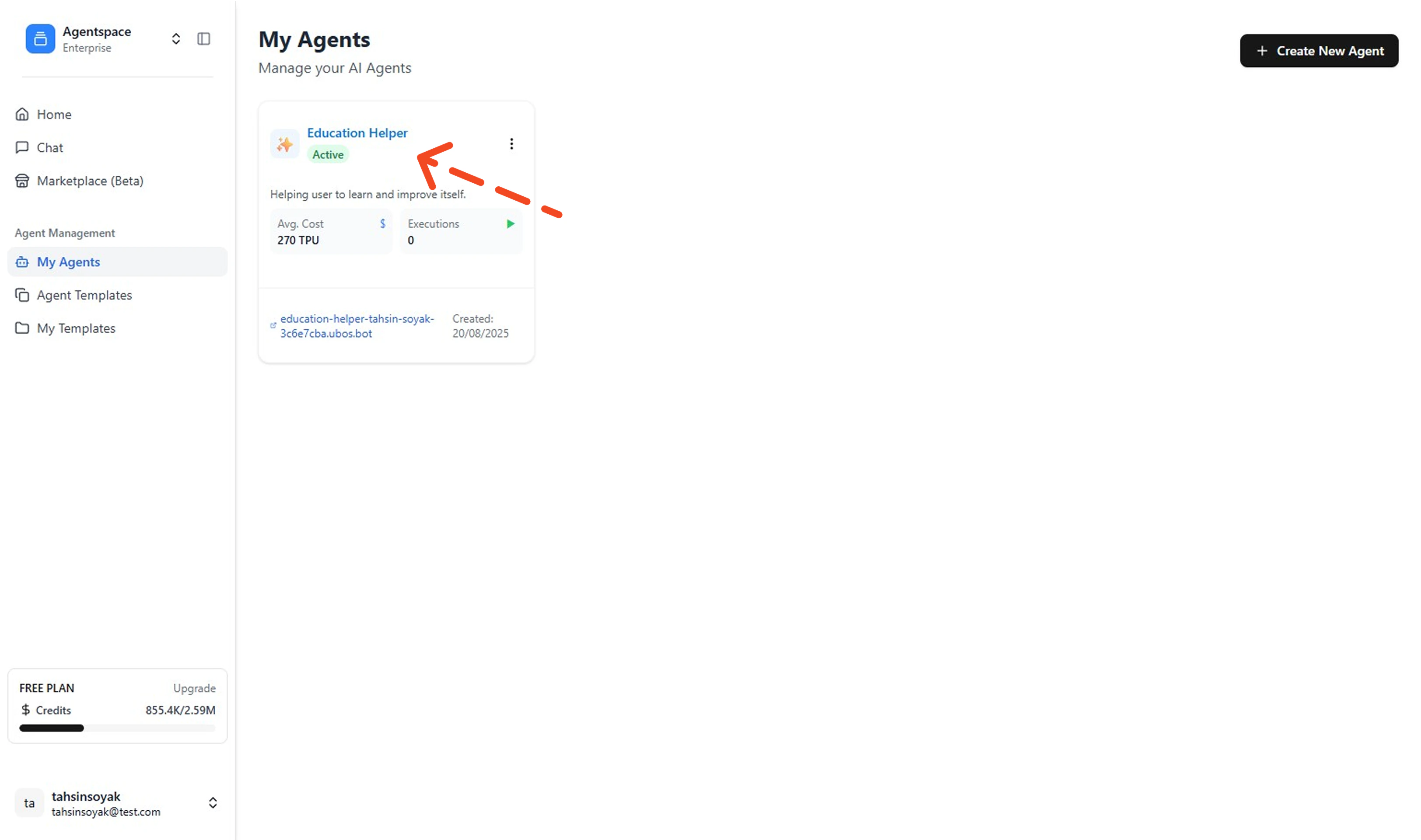
1. **Open My Agents & Select an Agent**
Go to your Left Menu and click **My Agents**. Then click the agent you want to add an action to (opens its details).
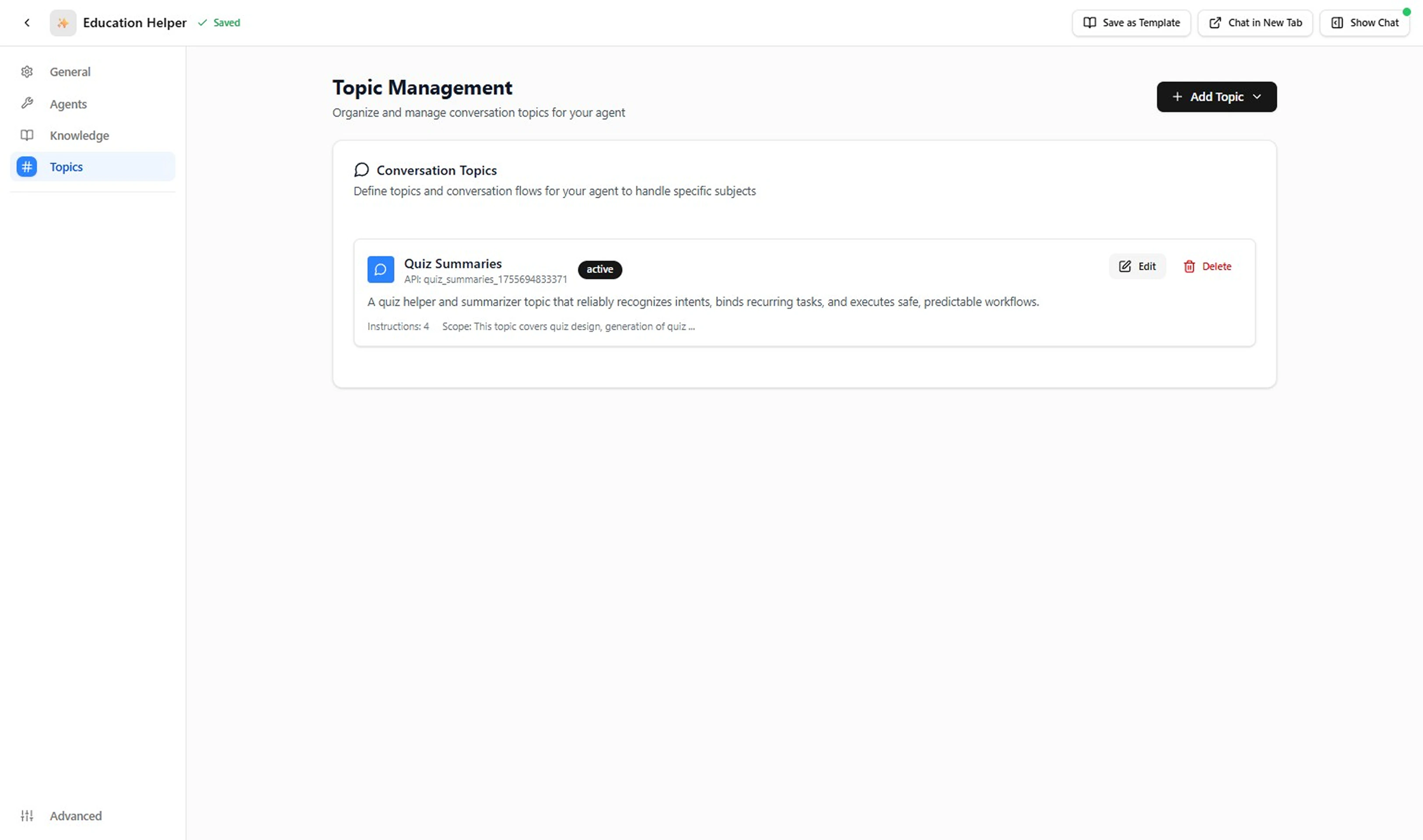
 2. **Open the Topics Tab**
In the agent's left menu, click **Topics** to view existing Topics.
2. **Open the Topics Tab**
In the agent's left menu, click **Topics** to view existing Topics.
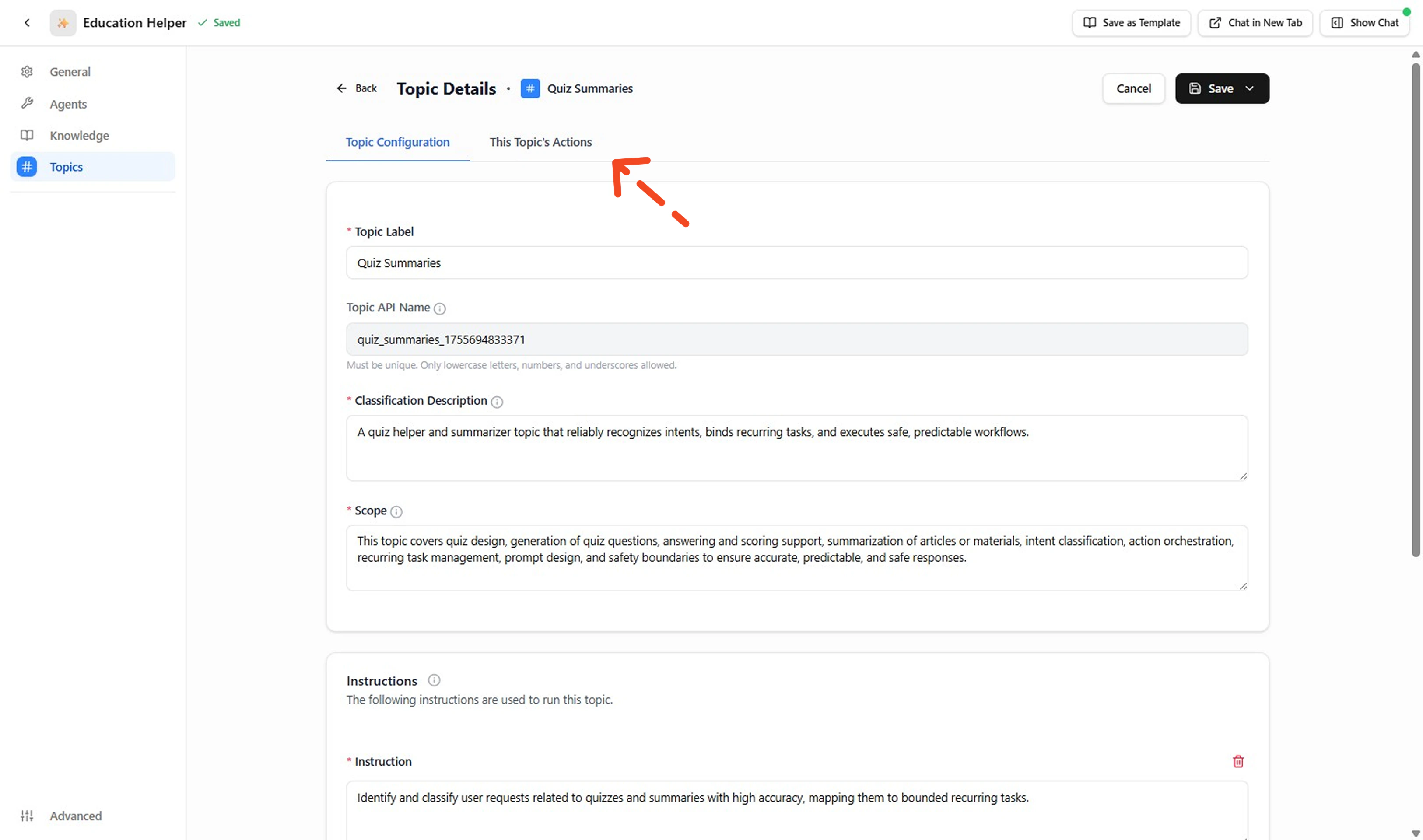
 3. **Open the Topic's Actions**
Click the Topic name, then open **This Topic's Actions** to see any attached Actions.
3. **Open the Topic's Actions**
Click the Topic name, then open **This Topic's Actions** to see any attached Actions.
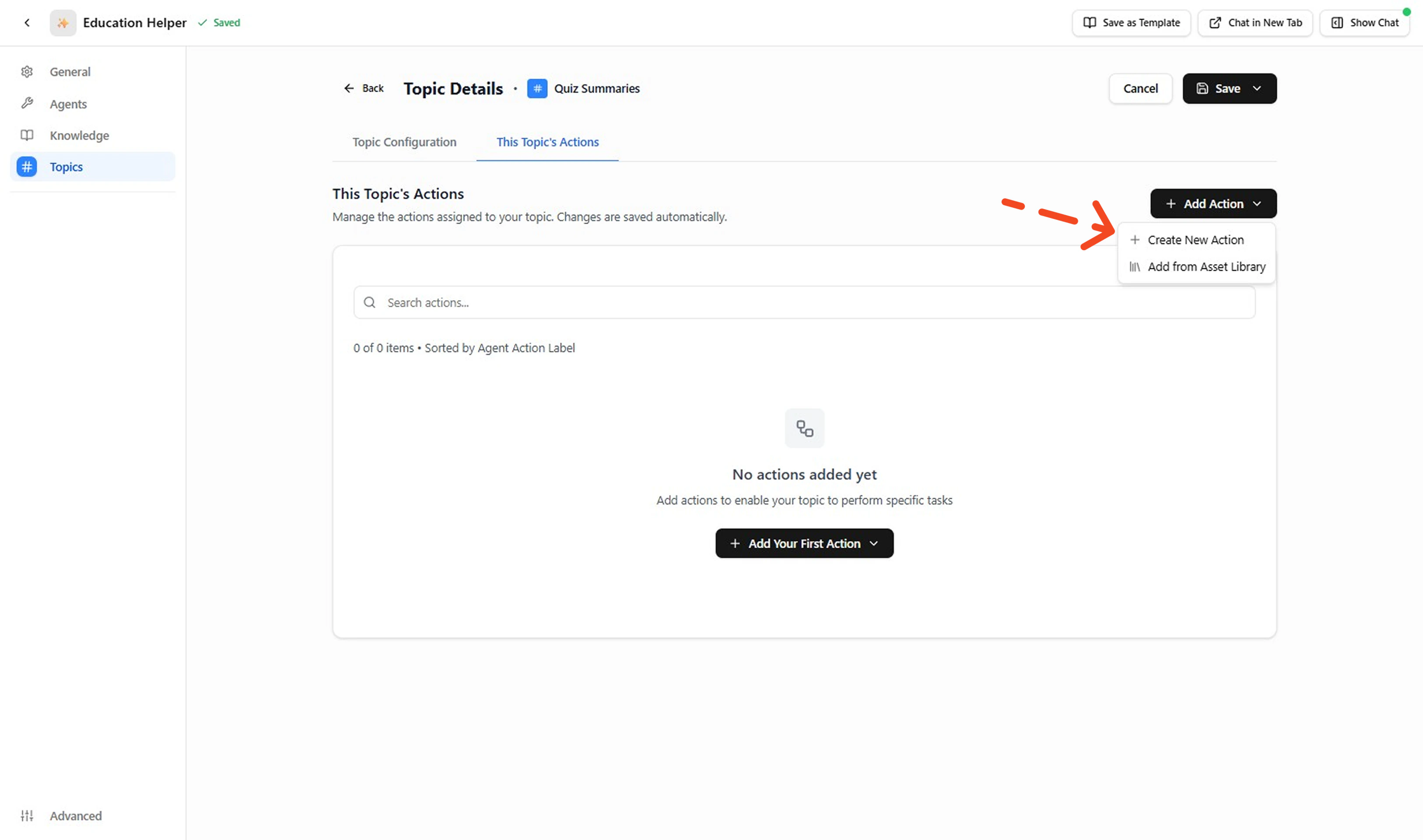
 4. **Create a New Action**
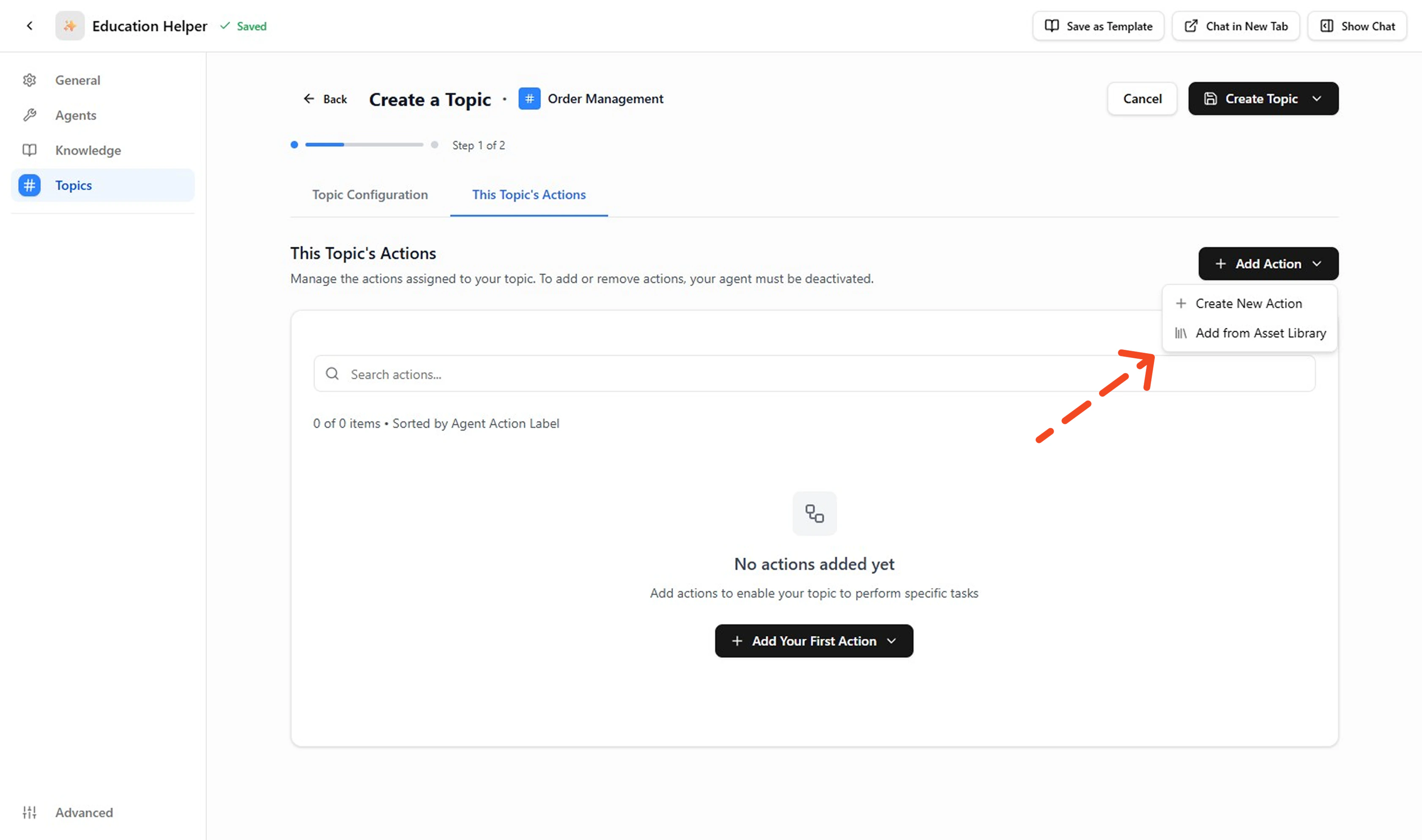
This page lists the Actions attached to the selected Topic. To add an Action: click **+ Add Action** then click the **+ Create a New Action** and proceed to configure the Action.
4. **Create a New Action**
This page lists the Actions attached to the selected Topic. To add an Action: click **+ Add Action** then click the **+ Create a New Action** and proceed to configure the Action.
 ***
## Create Your Own API Action
5. **Fill Action Details**
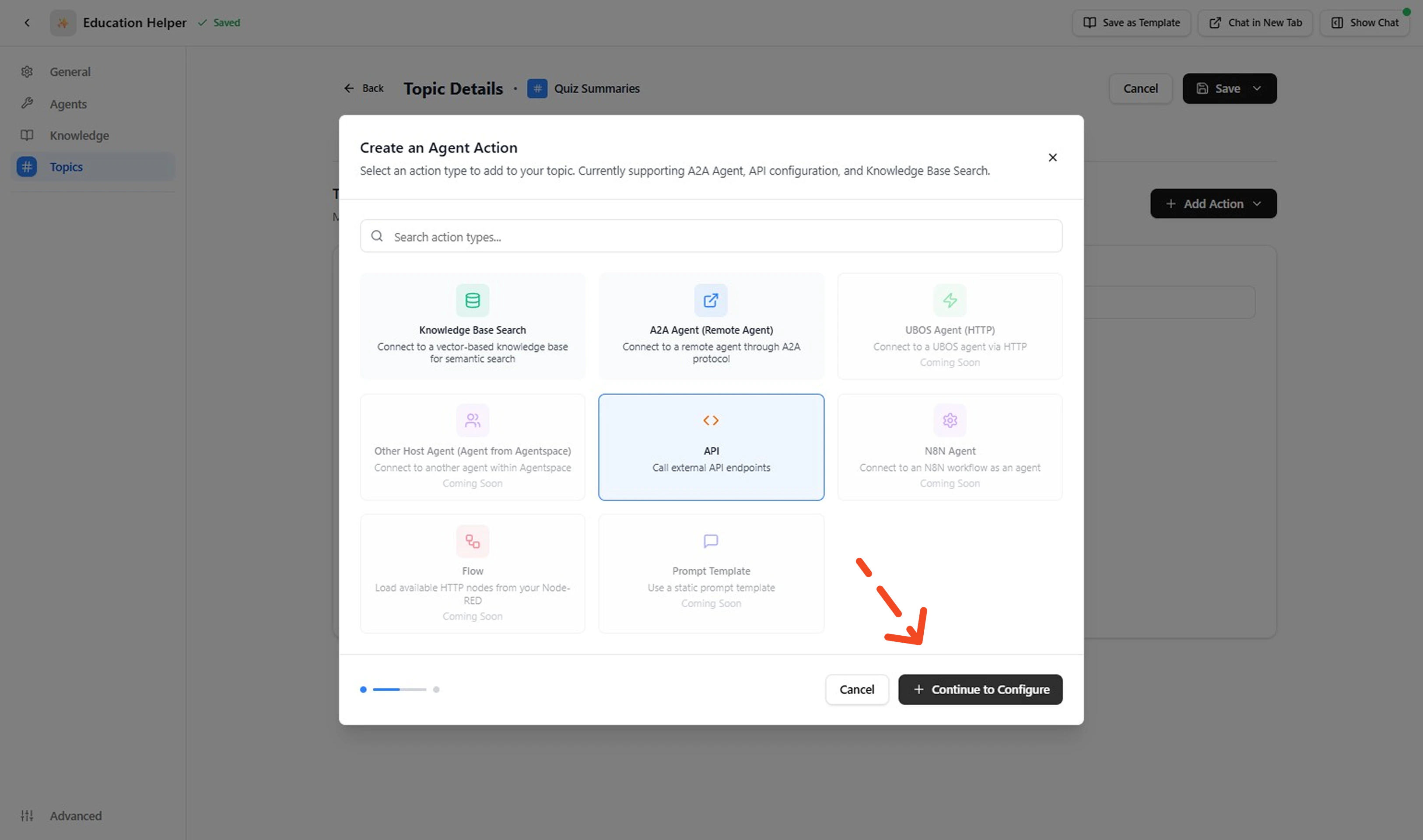
Select **API** action and click to **Continue to Configure**. Complete fields in each block: Basic Info, Endpoint Configuration, Authentication, Query Params, Custom Headers, Input Parameters, Output Schema, Advanced Settings. Keep labels short and outputs lean.
***
## Create Your Own API Action
5. **Fill Action Details**
Select **API** action and click to **Continue to Configure**. Complete fields in each block: Basic Info, Endpoint Configuration, Authentication, Query Params, Custom Headers, Input Parameters, Output Schema, Advanced Settings. Keep labels short and outputs lean.
 **Example (Get Product Details)**
| Field | Example | Notes |
| ---------------- | ------------------------------------------------ | ---------------------------------------------------------------------------- |
| Label | `Get Product Details` | Clear verb + object. |
| Description | Call external API endpoints | Refine later with disambiguator (e.g., "Returns name, price, availability"). |
| Base URL | `https://external-agent-.../testenvcloudlabs.cn` | Version / environment explicit. |
| HTTP Method | `POST` | Matches service contract (use GET if retrieval only). |
| Endpoint Path | `/getproduct` | No trailing slash duplication. |
| Authentication | No Authentication (example) | Replace with real auth when secured. |
| Query Parameters | (none) | Add only if filtering needed. |
| Custom Headers | (none) | Insert `Accept: application/json` etc. if required. |
| Input Parameters | `productId` (string, required) | Single required key. |
| Output Schema | `productDetails` (string) | Replace with structured fields when mapping added. |
| Timeout | `30` seconds | Tune to API latency. |
| Retries | `0` | Increase only for idempotent calls. |
| Error Handling | Throw Error | Fail fast for visibility. |
| Response Mapping | (empty) | Add transform once response shape confirmed. |
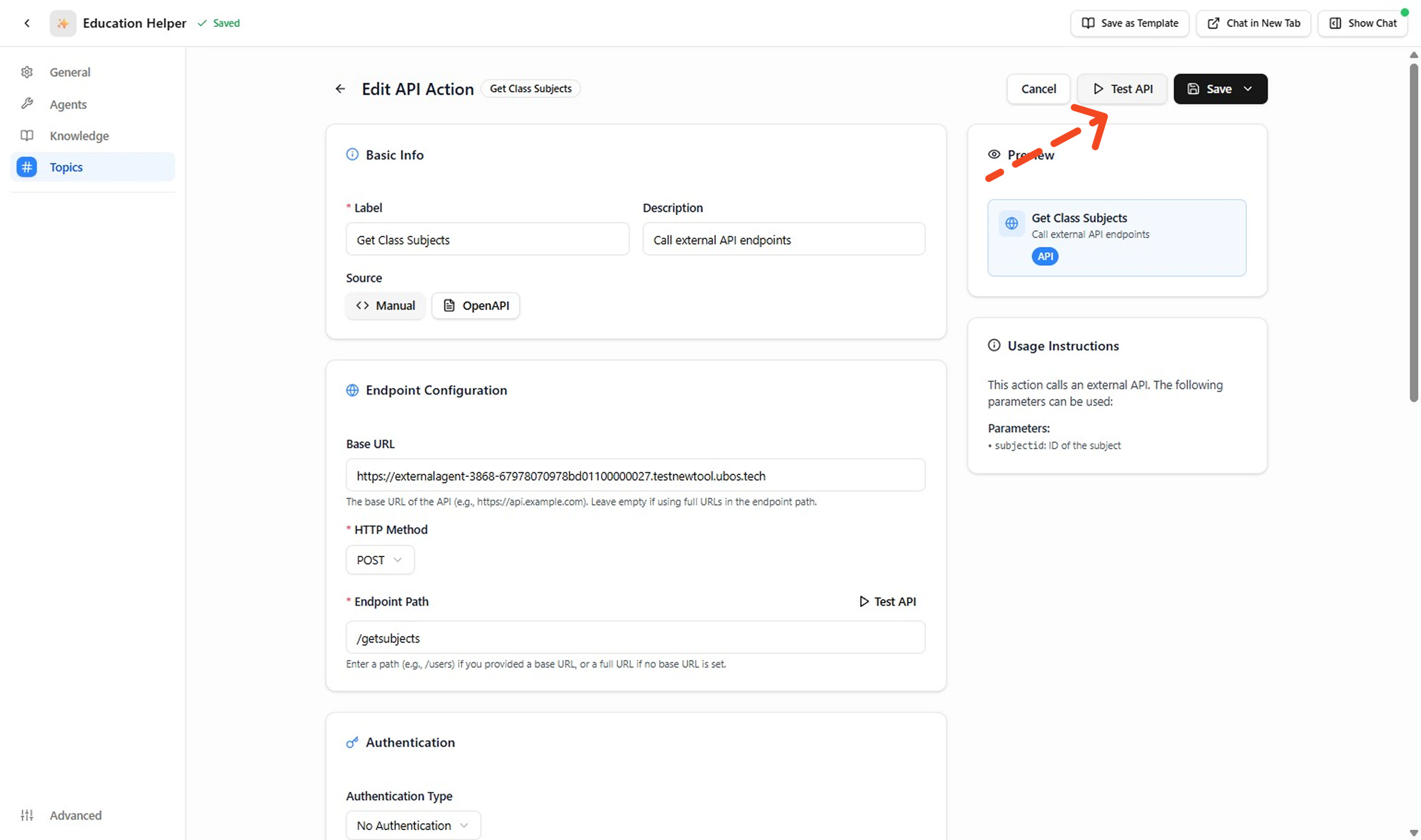
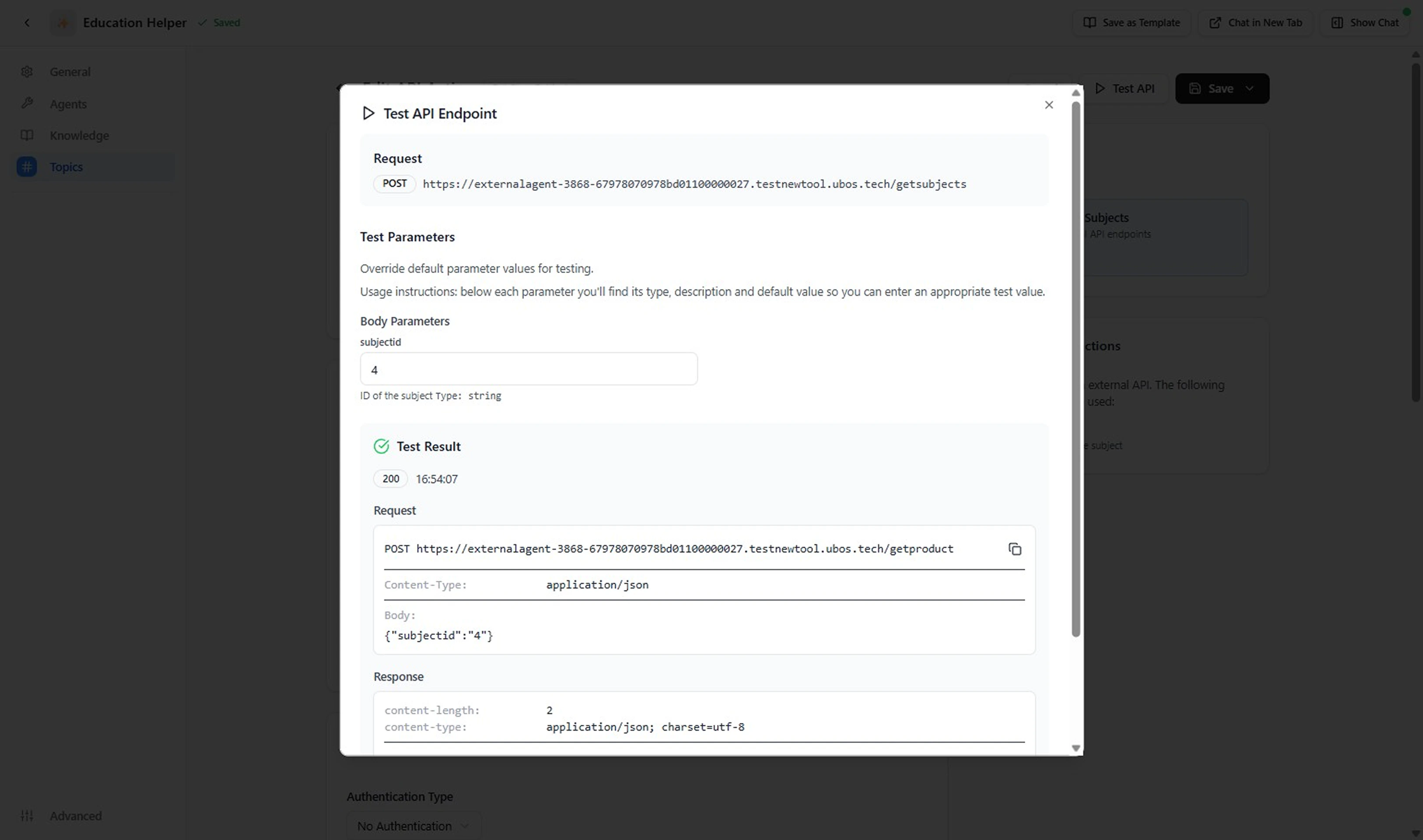
6. **Test the API Action**
Click **Test API**. Check assembled URL, method, headers, body, status code, and mapped outputs. Iterate until: correct status, expected latency, outputs populated, no secrets leaked.
**Example (Get Product Details)**
| Field | Example | Notes |
| ---------------- | ------------------------------------------------ | ---------------------------------------------------------------------------- |
| Label | `Get Product Details` | Clear verb + object. |
| Description | Call external API endpoints | Refine later with disambiguator (e.g., "Returns name, price, availability"). |
| Base URL | `https://external-agent-.../testenvcloudlabs.cn` | Version / environment explicit. |
| HTTP Method | `POST` | Matches service contract (use GET if retrieval only). |
| Endpoint Path | `/getproduct` | No trailing slash duplication. |
| Authentication | No Authentication (example) | Replace with real auth when secured. |
| Query Parameters | (none) | Add only if filtering needed. |
| Custom Headers | (none) | Insert `Accept: application/json` etc. if required. |
| Input Parameters | `productId` (string, required) | Single required key. |
| Output Schema | `productDetails` (string) | Replace with structured fields when mapping added. |
| Timeout | `30` seconds | Tune to API latency. |
| Retries | `0` | Increase only for idempotent calls. |
| Error Handling | Throw Error | Fail fast for visibility. |
| Response Mapping | (empty) | Add transform once response shape confirmed. |
6. **Test the API Action**
Click **Test API**. Check assembled URL, method, headers, body, status code, and mapped outputs. Iterate until: correct status, expected latency, outputs populated, no secrets leaked.
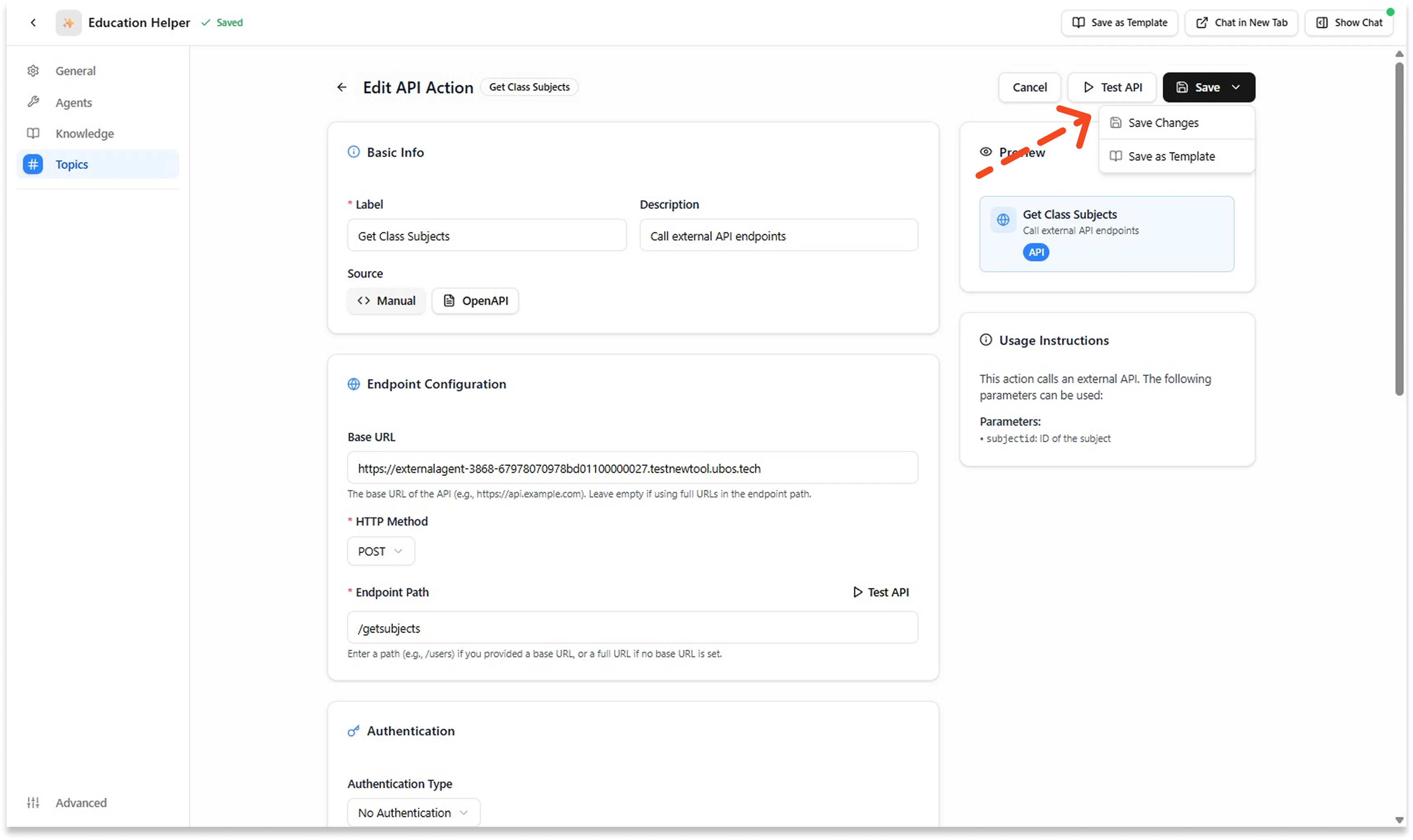
 7. **Save the API Action**
When satisfied, press **Save**.
7. **Save the API Action**
When satisfied, press **Save**.
 8. **Validate in Chat**
Use the right‑side chat. Trigger phrases that *should* invoke the Action plus a phrase that should route elsewhere. Adjust Description if mis‑selected.
***
## Use an Action Template
Leverage a pre-built template when your operation is common (lookup, list, status check) and you want speed + consistency.
1. **Access the Asset Library**
Go to your Agent → **Topics** → open the relevant Topic → **This Topic's Actions** → click **Add from Asset Library**.
8. **Validate in Chat**
Use the right‑side chat. Trigger phrases that *should* invoke the Action plus a phrase that should route elsewhere. Adjust Description if mis‑selected.
***
## Use an Action Template
Leverage a pre-built template when your operation is common (lookup, list, status check) and you want speed + consistency.
1. **Access the Asset Library**
Go to your Agent → **Topics** → open the relevant Topic → **This Topic's Actions** → click **Add from Asset Library**.
 2. **Browse and Search Templates**
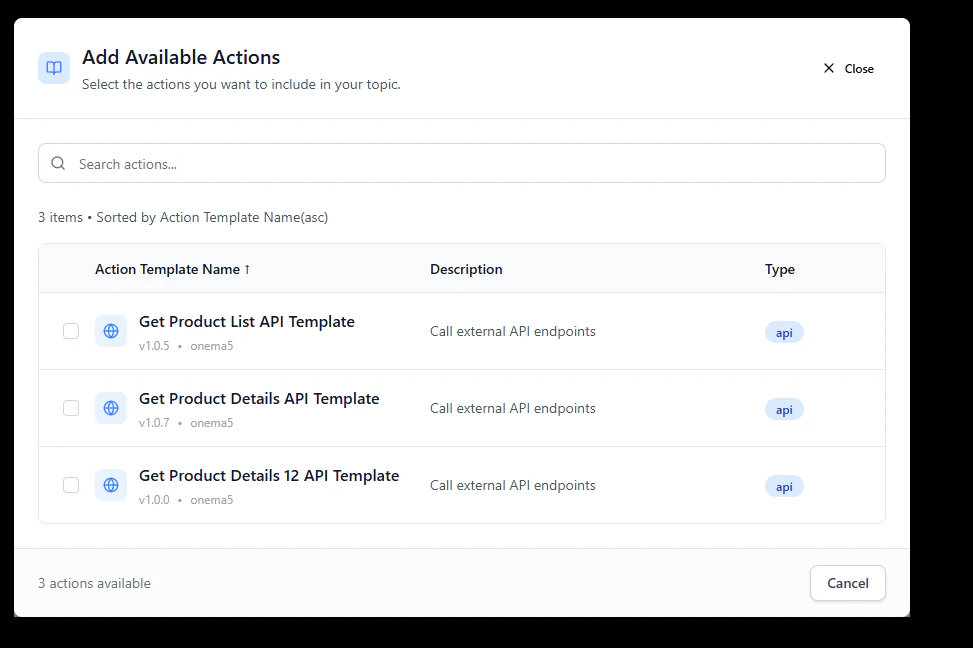
Search or filter by keyword (product, order, quiz, invoice) to find relevant templates.
3. **Preview Template Details**
Review the template's Label, Description, Inputs, Outputs, HTTP Method, Base URL/Path, Authentication, and Headers to ensure it matches your needs.
4. **Select and Apply Template**
Click one **Template** to clone the action into your Topic.
2. **Browse and Search Templates**
Search or filter by keyword (product, order, quiz, invoice) to find relevant templates.
3. **Preview Template Details**
Review the template's Label, Description, Inputs, Outputs, HTTP Method, Base URL/Path, Authentication, and Headers to ensure it matches your needs.
4. **Select and Apply Template**
Click one **Template** to clone the action into your Topic.
 5. **Customize Template Details**
Modify ONLY what's required:
* Ensure a unique label / API name (avoid collisions)
* Update auth to your secret reference
* Adjust Base URL / path placeholders
* Remove unused params & outputs
* Narrow the description (state one clear purpose)
* Provide Example Input JSON if absent
* Validate timeouts/retries for your API
6. **Test and Validate the Action**
Click **Test API** to verify assembled URL, method, headers, body, status code, and mapped outputs. Then **Save** and validate in chat to confirm the agent calls the correct action.
**Testing Your Action**
A passing test confirms: correct status code, expected response shape, and mapped output fields populated. If the test fails, check auth credentials, endpoint path, and input parameter formatting before retrying.
***
**Done!** You've created (or templated) an Action and hardened its definition.
## Next Steps
* Browse reusable templates → [Action Asset Library](/agentspace/action-asset-library)
* Back to concepts → [What is an Action](/agentspace/what-is-an-action)
* Back to topic guide → [How to Create a Topic](/agentspace/how-to-create-topic)
5. **Customize Template Details**
Modify ONLY what's required:
* Ensure a unique label / API name (avoid collisions)
* Update auth to your secret reference
* Adjust Base URL / path placeholders
* Remove unused params & outputs
* Narrow the description (state one clear purpose)
* Provide Example Input JSON if absent
* Validate timeouts/retries for your API
6. **Test and Validate the Action**
Click **Test API** to verify assembled URL, method, headers, body, status code, and mapped outputs. Then **Save** and validate in chat to confirm the agent calls the correct action.
**Testing Your Action**
A passing test confirms: correct status code, expected response shape, and mapped output fields populated. If the test fails, check auth credentials, endpoint path, and input parameter formatting before retrying.
***
**Done!** You've created (or templated) an Action and hardened its definition.
## Next Steps
* Browse reusable templates → [Action Asset Library](/agentspace/action-asset-library)
* Back to concepts → [What is an Action](/agentspace/what-is-an-action)
* Back to topic guide → [How to Create a Topic](/agentspace/how-to-create-topic)