> ## Documentation Index
> Fetch the complete documentation index at: https://benchgen.com/docs/llms.txt
> Use this file to discover all available pages before exploring further.
# Bundle Structure
> The files inside a custom environment .zip bundle and what each one does.
A BenchGen environment bundle is a `.zip` file. BenchGen unpacks it, reads the `competition.yaml` at the root, and assembles the environment from the files declared there.
***
## Top-level layout
```
my_environment.zip
├── competition.yaml
├── logo.png ← optional
├── overview.md ← optional
├── reference_data.zip
├── scoring_program.zip
├── ingestion_program.zip ← optional
└── input_data.zip ← optional
```
Files can be placed inside subdirectories — they just need to be referenced by their full relative path inside `competition.yaml`.
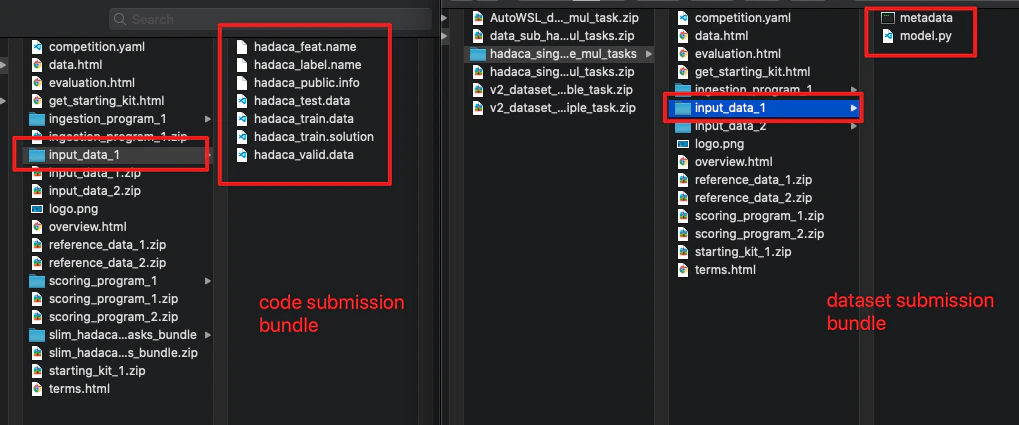
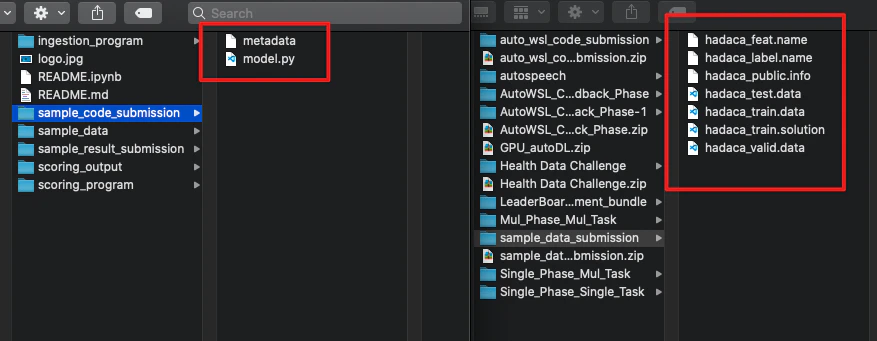
The two screenshots below show what a real code submission bundle (left) and dataset submission bundle (right) look like on disk:
 ***
## Files explained
### `competition.yaml`
The only required file at the root. It defines the environment's metadata, tasks, phases, and leaderboard. Every other file in the bundle is referenced from here.
See the [YAML reference](/eval/yaml-reference) for a full field-by-field breakdown.
***
### Reference data (`reference_data.zip`)
The ground-truth answers your scoring program uses to judge a model's outputs. Only the scoring program reads this file — it is never exposed to the model being evaluated.
Reference data can be anything your scoring program can parse: CSV rows, JSON objects, plain text labels, or structured prediction targets. The format is entirely up to you as long as your scoring program can read it.
***
### Scoring program (`scoring_program.zip`)
The script that decides whether a model's output is correct. BenchGen runs this after every submission.
The zip must contain:
* Your scoring script (e.g. `scoring.py`)
* A `metadata.yaml` that specifies the command used to run it
**`metadata.yaml` example:**
```yaml theme={null}
command: python3 /app/program/scoring.py /app/input/ /app/output/
```
BenchGen mounts the following directories when running your script:
| Path | Contents |
| ----------------- | ------------------------------------ |
| `/app/input/res/` | The model's predictions |
| `/app/input/ref/` | Your reference data |
| `/app/output/` | Where your script writes its results |
| `/app/program/` | Your scoring program files |
Your script must write a `scores.json` to `/app/output/`:
```json theme={null}
{"accuracy": 0.91, "f1": 0.87}
```
The keys must match the leaderboard column keys defined in `competition.yaml`. Any additional keys are ignored.
Your scoring program can also write a `detailed_results.html` to `/app/output/` to display per-submission result breakdowns in the BenchGen UI.
***
### Ingestion program (`ingestion_program.zip`) — optional
An ingestion program is needed when BenchGen runs the model end-to-end as part of the evaluation rather than receiving pre-generated outputs. It takes input data, calls the model, and writes predictions that the scoring program then evaluates.
The zip must contain your ingestion script and a `metadata.yaml` file at the root of the folder:
***
## Files explained
### `competition.yaml`
The only required file at the root. It defines the environment's metadata, tasks, phases, and leaderboard. Every other file in the bundle is referenced from here.
See the [YAML reference](/eval/yaml-reference) for a full field-by-field breakdown.
***
### Reference data (`reference_data.zip`)
The ground-truth answers your scoring program uses to judge a model's outputs. Only the scoring program reads this file — it is never exposed to the model being evaluated.
Reference data can be anything your scoring program can parse: CSV rows, JSON objects, plain text labels, or structured prediction targets. The format is entirely up to you as long as your scoring program can read it.
***
### Scoring program (`scoring_program.zip`)
The script that decides whether a model's output is correct. BenchGen runs this after every submission.
The zip must contain:
* Your scoring script (e.g. `scoring.py`)
* A `metadata.yaml` that specifies the command used to run it
**`metadata.yaml` example:**
```yaml theme={null}
command: python3 /app/program/scoring.py /app/input/ /app/output/
```
BenchGen mounts the following directories when running your script:
| Path | Contents |
| ----------------- | ------------------------------------ |
| `/app/input/res/` | The model's predictions |
| `/app/input/ref/` | Your reference data |
| `/app/output/` | Where your script writes its results |
| `/app/program/` | Your scoring program files |
Your script must write a `scores.json` to `/app/output/`:
```json theme={null}
{"accuracy": 0.91, "f1": 0.87}
```
The keys must match the leaderboard column keys defined in `competition.yaml`. Any additional keys are ignored.
Your scoring program can also write a `detailed_results.html` to `/app/output/` to display per-submission result breakdowns in the BenchGen UI.
***
### Ingestion program (`ingestion_program.zip`) — optional
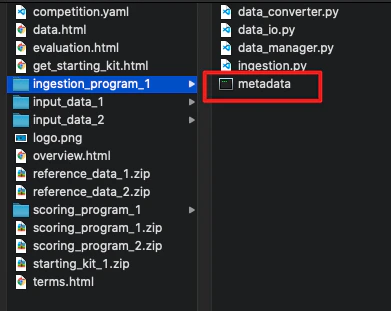
An ingestion program is needed when BenchGen runs the model end-to-end as part of the evaluation rather than receiving pre-generated outputs. It takes input data, calls the model, and writes predictions that the scoring program then evaluates.
The zip must contain your ingestion script and a `metadata.yaml` file at the root of the folder:
 The zip structure mirrors the scoring program: your script plus a `metadata.yaml`.
**`metadata.yaml` example:**
```yaml theme={null}
command: python3 /app/program/ingestion.py /app/input_data/ /app/output/ /app/program /app/ingested_program
```
BenchGen mounts:
| Path | Contents |
| ------------------------ | ------------------------------------------------------- |
| `/app/input_data/` | Your input data |
| `/app/ingested_program/` | The model submission being evaluated |
| `/app/output/` | Where predictions are written (read by scoring program) |
| `/app/program/` | Your ingestion program files |
The argument order in `metadata.yaml` differs depending on your submission mode. In **code submission** mode the model code is `$submission_program`; in **dataset submission** mode the dataset is `$submission_program` and your sample code becomes `$input`:
The zip structure mirrors the scoring program: your script plus a `metadata.yaml`.
**`metadata.yaml` example:**
```yaml theme={null}
command: python3 /app/program/ingestion.py /app/input_data/ /app/output/ /app/program /app/ingested_program
```
BenchGen mounts:
| Path | Contents |
| ------------------------ | ------------------------------------------------------- |
| `/app/input_data/` | Your input data |
| `/app/ingested_program/` | The model submission being evaluated |
| `/app/output/` | Where predictions are written (read by scoring program) |
| `/app/program/` | Your ingestion program files |
The argument order in `metadata.yaml` differs depending on your submission mode. In **code submission** mode the model code is `$submission_program`; in **dataset submission** mode the dataset is `$submission_program` and your sample code becomes `$input`:
 ***
### Input data (`input_data.zip`) — optional
The test inputs handed to the ingestion program at run time. This is typically the prompt set, test features, or context documents your model needs to generate predictions. It is separate from the reference data so that the evaluation remains blind — the model sees inputs but never the answers.
***
## Validation
When you upload a bundle, BenchGen checks:
* `competition.yaml` is present at the root and parses without errors
* All files referenced in `competition.yaml` exist inside the zip
* The scoring program zip contains a `metadata.yaml` with a `command` key
* Leaderboard column keys in `competition.yaml` match at least one key expected in `scores.json`
Validation errors are shown inline on the upload screen with the specific field or file causing the issue.
***
## Next steps
* [YAML reference](/eval/yaml-reference) — all fields in `competition.yaml`
* [Create a custom environment](/eval/create-environment) — end-to-end upload walkthrough
***
### Input data (`input_data.zip`) — optional
The test inputs handed to the ingestion program at run time. This is typically the prompt set, test features, or context documents your model needs to generate predictions. It is separate from the reference data so that the evaluation remains blind — the model sees inputs but never the answers.
***
## Validation
When you upload a bundle, BenchGen checks:
* `competition.yaml` is present at the root and parses without errors
* All files referenced in `competition.yaml` exist inside the zip
* The scoring program zip contains a `metadata.yaml` with a `command` key
* Leaderboard column keys in `competition.yaml` match at least one key expected in `scores.json`
Validation errors are shown inline on the upload screen with the specific field or file causing the issue.
***
## Next steps
* [YAML reference](/eval/yaml-reference) — all fields in `competition.yaml`
* [Create a custom environment](/eval/create-environment) — end-to-end upload walkthrough