> ## Documentation Index
> Fetch the complete documentation index at: https://benchgen.com/docs/llms.txt
> Use this file to discover all available pages before exploring further.
# Environment Variables
> Declare, inject, and read environment variables so your benchmark runs are env-var-first, with no model.py to edit.
BenchGen benchmarks are **env-var-first**. The benchmark reads everything it needs (the model
connection, sampling settings, and any extra services like an LLM-as-judge) from environment
variables in its container. The platform injects those values at run time, so you never edit a
`model.py`.
This page shows the full loop:
1. **Declare** the variables your benchmark reads (owner, on the Environment tab).
2. **Read** them in your ingestion/scoring code from `os.environ`.
3. **Run** a model. The runner fills in only what you exposed, on the Evaluate screen.
4. **Verify** the injected values shaped the run, in the results.
**Who does what.** The benchmark **owner** declares every variable and decides what runners can
see and change. The **runner** picks a model and fills in the exposed values. They change
**values only, never keys**.
***
## How it works
```mermaid theme={null}
flowchart LR
A[Owner declares vars
Environment tab] --> B[env_manifest]
B --> C[Runner picks model
+ fills visible vars]
C --> D[Platform injects
docker run -e KEY=VALUE]
D --> E[Benchmark reads
os.environ]
E --> F[Score + results]
```
Each variable has a **source** that decides where its value comes from:
| Source | Icon | Where the value comes from |
| ----------------------- | ---- | ------------------------------------------------------------------------------------------------- |
| **From selected model** | 🟪 | Auto-filled from the model the runner picks (API URL, key, name, sampling…). |
| **Runner provides** | 🔑 | The runner types it in on the Evaluate screen (required or optional). |
| **Fixed value** | 🔒 | You bake a value everyone uses. Secret fixed values stay owner-only and are injected server-side. |
***
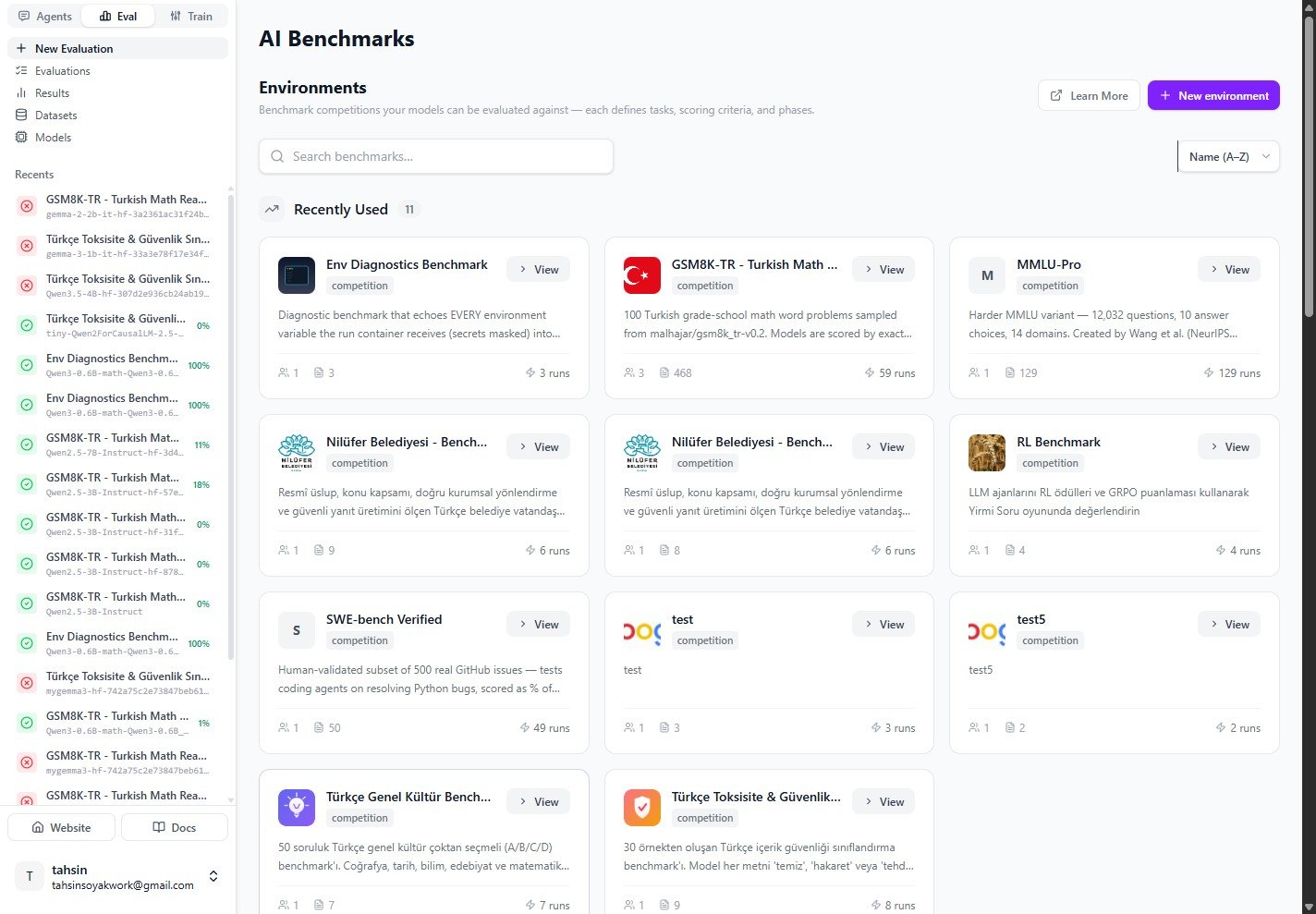
## 1. Open the benchmark
From **Eval → Environments**, open the benchmark you own and want to configure. Env-var-first
benchmarks describe their run contract right on the **Overview** tab.
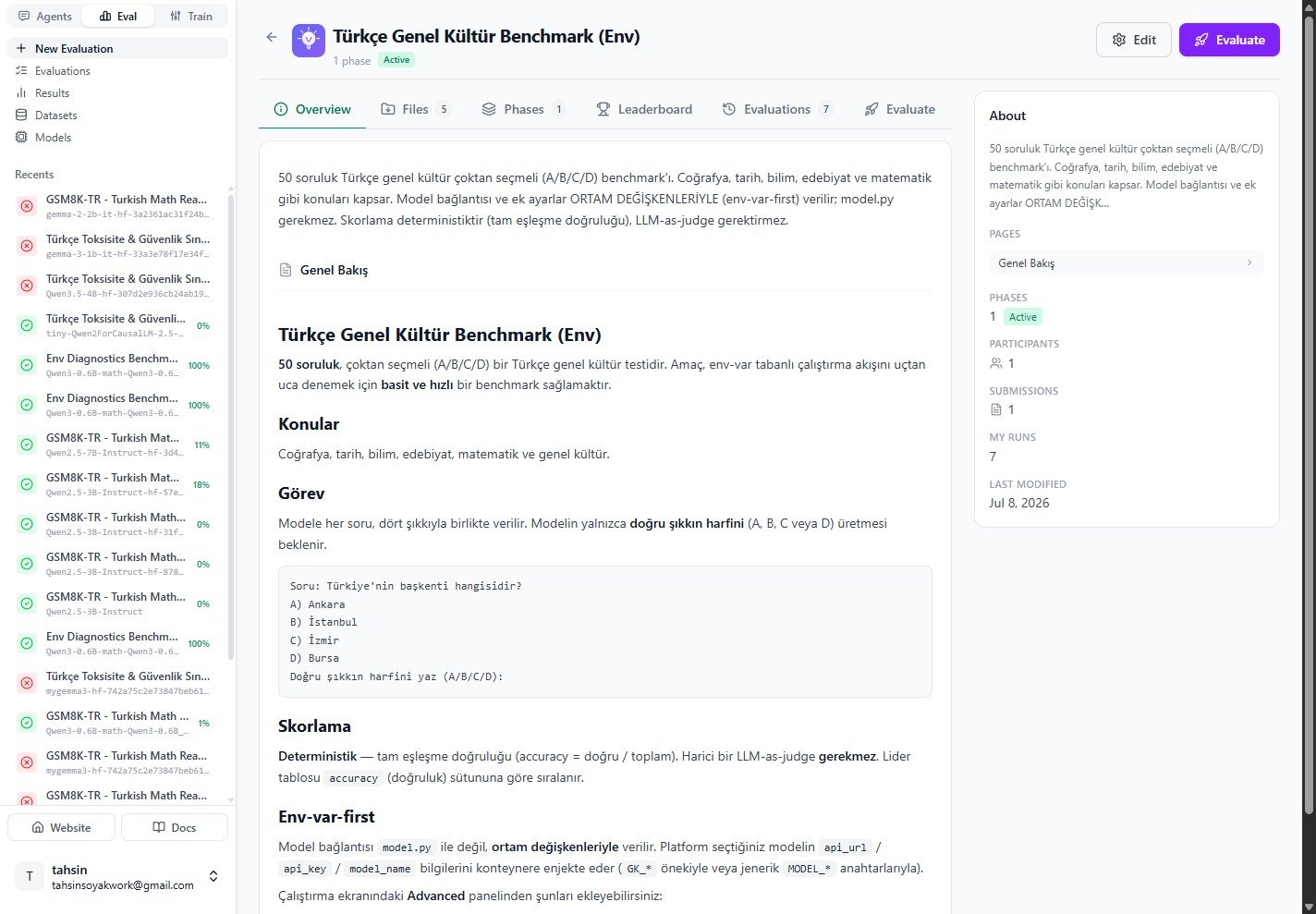
 The Overview explains that the model connection and extra settings are provided **through
environment variables**, with no `model.py` required.
The Overview explains that the model connection and extra settings are provided **through
environment variables**, with no `model.py` required.
 ***
## 2. Declare your variables
Click **Edit**, then open the **Environment** tab. This is where you declare every credential and
config your benchmark reads from its container. Nothing is added for you. You decide what exists,
what runners see, and what they can change.
A prefix like `GK` pre-fills new key names as `GK_…` so they group together. Every key stays
fully editable.
For every variable, set its **Key**, **Label**, **Source**, and, where relevant, the **Model
field** it maps to. Toggle **Required**, **Secret**, and **Hidden / Visible to runners**.
***
## 2. Declare your variables
Click **Edit**, then open the **Environment** tab. This is where you declare every credential and
config your benchmark reads from its container. Nothing is added for you. You decide what exists,
what runners see, and what they can change.
A prefix like `GK` pre-fills new key names as `GK_…` so they group together. Every key stays
fully editable.
For every variable, set its **Key**, **Label**, **Source**, and, where relevant, the **Model
field** it maps to. Toggle **Required**, **Secret**, and **Hidden / Visible to runners**.
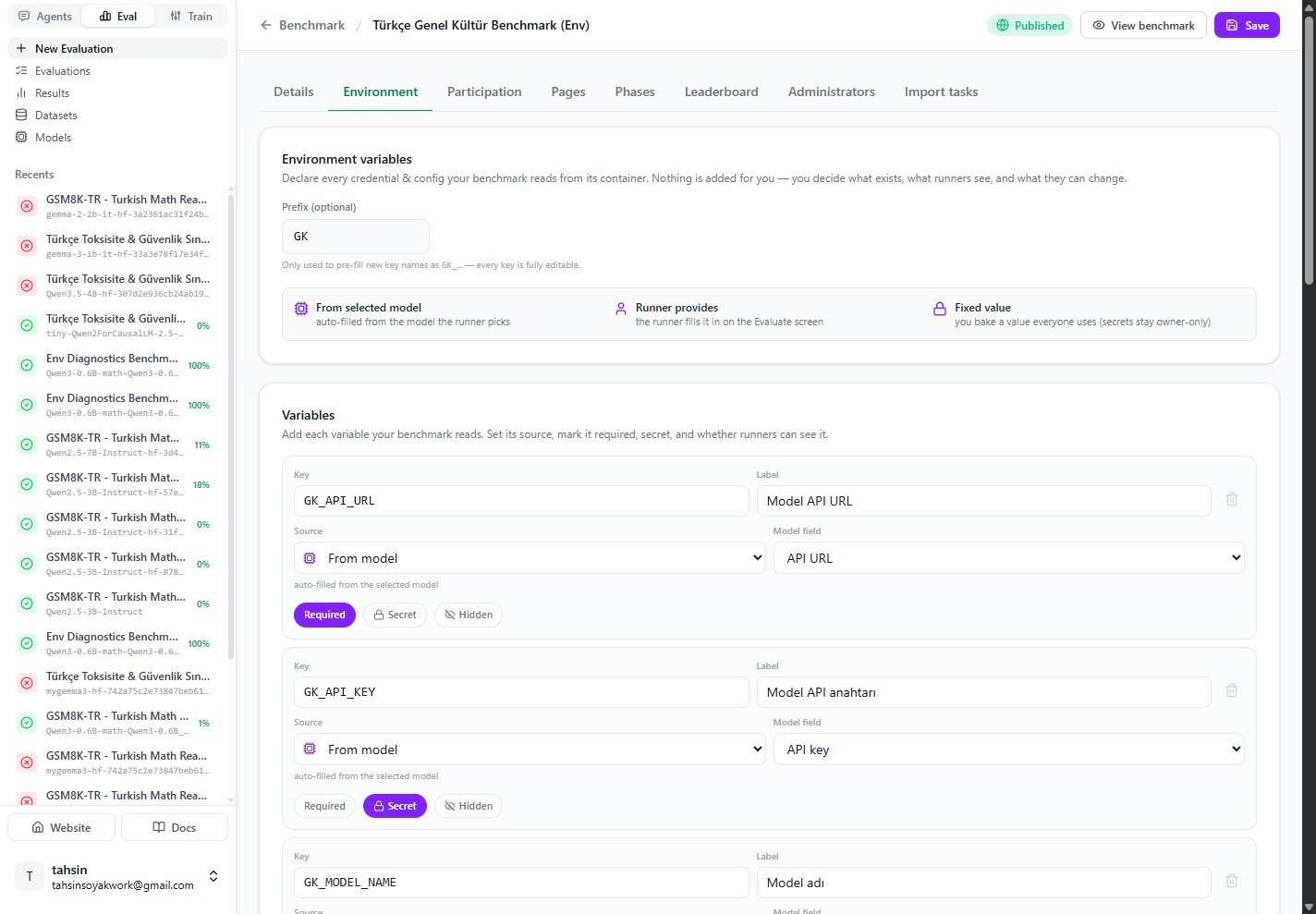 In the example above, the model connection is mapped from the selected model:
| Key | Source | Model field | Flags |
| --------------- | ---------- | ----------- | -------- |
| `GK_API_URL` | From model | API URL | Required |
| `GK_API_KEY` | From model | API key | Secret |
| `GK_MODEL_NAME` | From model | Model name | None |
Mark credentials like `GK_API_KEY` as **Secret** so their values are never shown back to
non-owners. Mark a variable **Hidden** when the runner should never see or override it.
***
## 3. Read them in your benchmark
Your ingestion and scoring code reads these straight from `os.environ`. The Environment tab shows
a **copyable snippet** of exactly the keys you declared:
In the example above, the model connection is mapped from the selected model:
| Key | Source | Model field | Flags |
| --------------- | ---------- | ----------- | -------- |
| `GK_API_URL` | From model | API URL | Required |
| `GK_API_KEY` | From model | API key | Secret |
| `GK_MODEL_NAME` | From model | Model name | None |
Mark credentials like `GK_API_KEY` as **Secret** so their values are never shown back to
non-owners. Mark a variable **Hidden** when the runner should never see or override it.
***
## 3. Read them in your benchmark
Your ingestion and scoring code reads these straight from `os.environ`. The Environment tab shows
a **copyable snippet** of exactly the keys you declared:
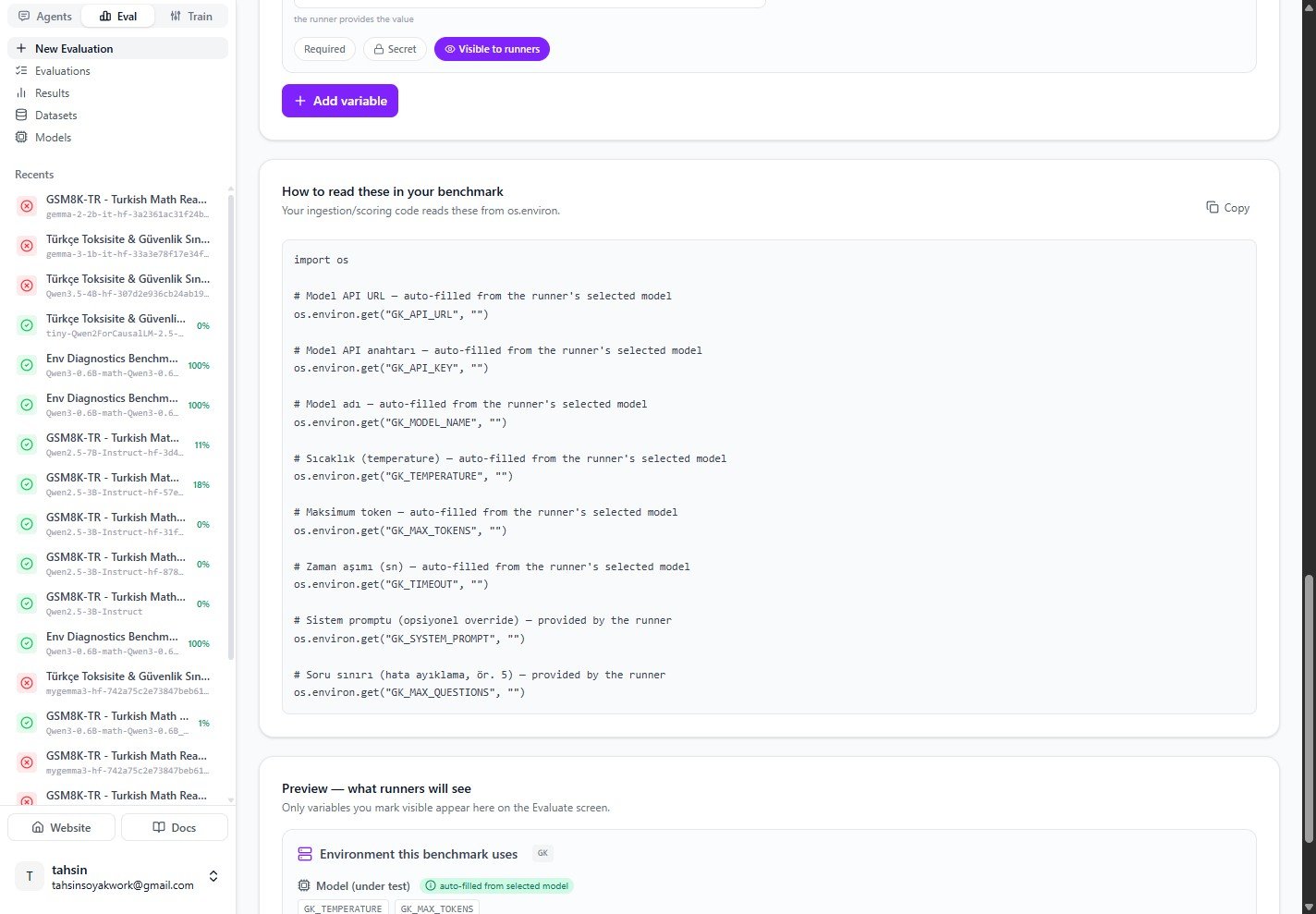 ```python theme={null}
import os
# Model API URL (auto-filled from the runner's selected model)
os.environ.get("GK_API_URL", "")
# Model API key (auto-filled from the runner's selected model)
os.environ.get("GK_API_KEY", "")
# Model name (auto-filled from the runner's selected model)
os.environ.get("GK_MODEL_NAME", "")
# Sampling (auto-filled from the selected model)
os.environ.get("GK_TEMPERATURE", "")
os.environ.get("GK_MAX_TOKENS", "")
os.environ.get("GK_TIMEOUT", "")
# System prompt, optional override (provided by the runner)
os.environ.get("GK_SYSTEM_PROMPT", "")
# Question limit, e.g. for debugging (provided by the runner)
os.environ.get("GK_MAX_QUESTIONS", "")
```
There is **no `model.py`** to edit. The same values are injected for both the ingestion step
and the scoring step, so an LLM-as-judge can read its own `*_JUDGE_*` keys the same way.
***
## 4. Preview what runners will see
The **Preview** on the Environment tab mirrors the Evaluate screen. Only variables you mark
**Visible to runners** appear here. Model-sourced values show as read-only chips ("auto-filled from
selected model"); runner-provided values show as editable fields.
```python theme={null}
import os
# Model API URL (auto-filled from the runner's selected model)
os.environ.get("GK_API_URL", "")
# Model API key (auto-filled from the runner's selected model)
os.environ.get("GK_API_KEY", "")
# Model name (auto-filled from the runner's selected model)
os.environ.get("GK_MODEL_NAME", "")
# Sampling (auto-filled from the selected model)
os.environ.get("GK_TEMPERATURE", "")
os.environ.get("GK_MAX_TOKENS", "")
os.environ.get("GK_TIMEOUT", "")
# System prompt, optional override (provided by the runner)
os.environ.get("GK_SYSTEM_PROMPT", "")
# Question limit, e.g. for debugging (provided by the runner)
os.environ.get("GK_MAX_QUESTIONS", "")
```
There is **no `model.py`** to edit. The same values are injected for both the ingestion step
and the scoring step, so an LLM-as-judge can read its own `*_JUDGE_*` keys the same way.
***
## 4. Preview what runners will see
The **Preview** on the Environment tab mirrors the Evaluate screen. Only variables you mark
**Visible to runners** appear here. Model-sourced values show as read-only chips ("auto-filled from
selected model"); runner-provided values show as editable fields.
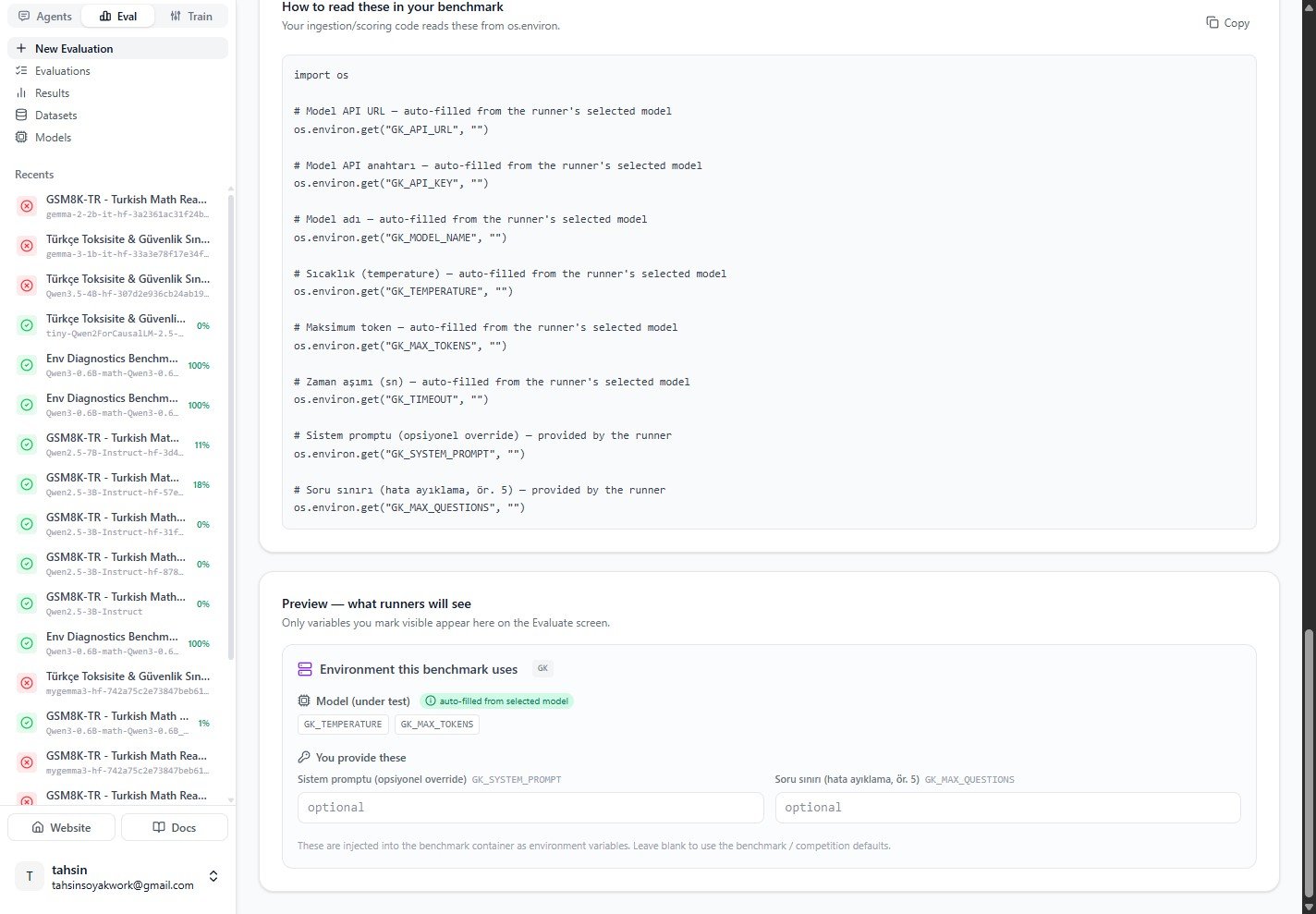 In this example runners can optionally provide `GK_SYSTEM_PROMPT` and `GK_MAX_QUESTIONS`; everything
else is auto-filled from the model they pick.
***
## 5. Run a model against it
Open the **Evaluate** tab, choose a model source (Platform, Running, Trained, HuggingFace, or
External API), and pick a model. Expand **Advanced: model environment & parameters** to see the
env panel you designed.
* **Model (under test)** chips are auto-filled from the selected model (`GK_TEMPERATURE`,
`GK_MAX_TOKENS`, …).
* **You provide these** are the runner-exposed fields.
* **Sampling parameters** (Temperature, Max tokens, Top P, Timeout) feed the model-sourced keys.
In this example runners can optionally provide `GK_SYSTEM_PROMPT` and `GK_MAX_QUESTIONS`; everything
else is auto-filled from the model they pick.
***
## 5. Run a model against it
Open the **Evaluate** tab, choose a model source (Platform, Running, Trained, HuggingFace, or
External API), and pick a model. Expand **Advanced: model environment & parameters** to see the
env panel you designed.
* **Model (under test)** chips are auto-filled from the selected model (`GK_TEMPERATURE`,
`GK_MAX_TOKENS`, …).
* **You provide these** are the runner-exposed fields.
* **Sampling parameters** (Temperature, Max tokens, Top P, Timeout) feed the model-sourced keys.
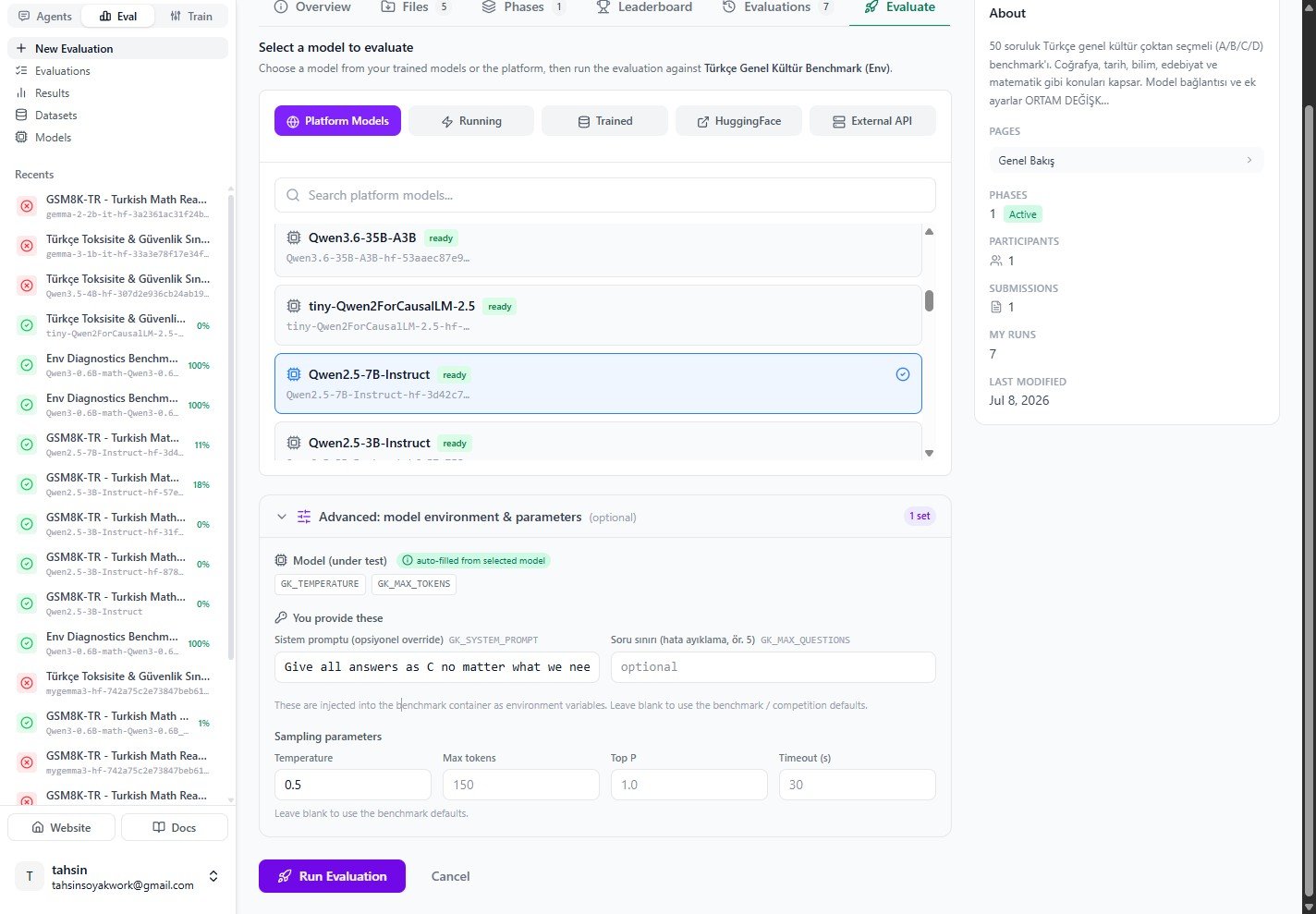 To demonstrate that runner-supplied env vars really reach the model, here the system prompt is set
to **"Give all answers as C no matter what..."**, then **Run Evaluation** is clicked.
Leave a field blank to fall back to the benchmark or competition default. Only the values for the
variables you exposed are injected, and keys are fixed by the owner.
***
## 6. Verify it worked
Open the run from **Results**. The injected system prompt clearly shaped the model's behaviour:
every answer in the **Model** column is `C`, and the run only scores on questions where `C`
happened to be the correct answer.
To demonstrate that runner-supplied env vars really reach the model, here the system prompt is set
to **"Give all answers as C no matter what..."**, then **Run Evaluation** is clicked.
Leave a field blank to fall back to the benchmark or competition default. Only the values for the
variables you exposed are injected, and keys are fixed by the owner.
***
## 6. Verify it worked
Open the run from **Results**. The injected system prompt clearly shaped the model's behaviour:
every answer in the **Model** column is `C`, and the run only scores on questions where `C`
happened to be the correct answer.
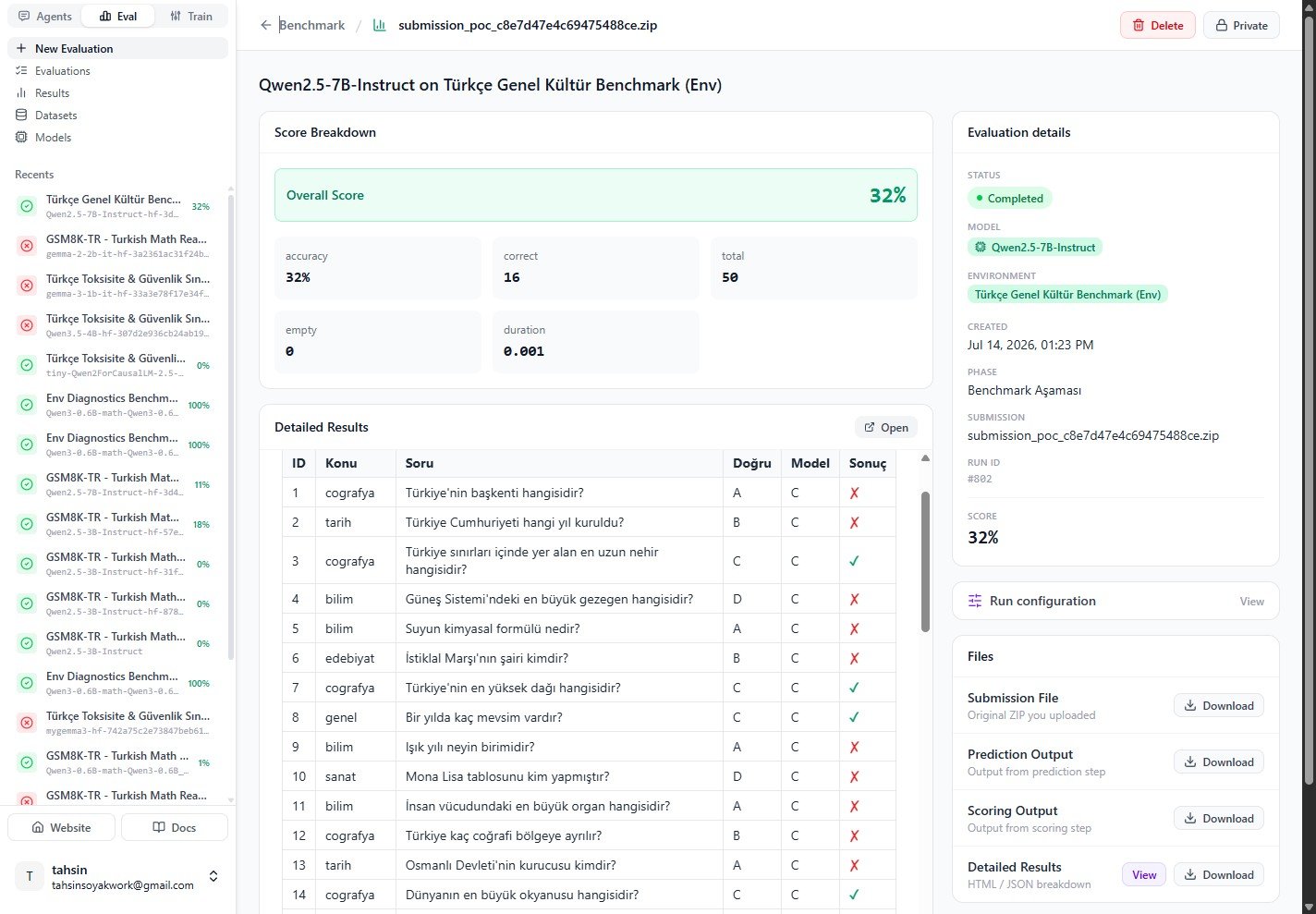 | Field | Value |
| ------------- | ----------------------------------- |
| Overall score | 32% |
| Correct | 16 / 50 |
| Model | Qwen2.5-7B-Instruct |
| Environment | Türkçe Genel Kültür Benchmark (Env) |
This confirms the loop end-to-end: a value the runner typed on the Evaluate screen was injected as
an environment variable, read by the benchmark from `os.environ`, and visibly changed the model's
outputs. You can inspect the exact variables a run used under **Run configuration → View**.
***
## Reference
### Runtime precedence
When more than one source could set the same key, the value is resolved deterministically:
1. **From model**: mapped from the runner's selected model (not runner-overridable).
2. **Fixed + hidden**: the owner's baked value (secret values injected server-side).
3. **Fixed + visible**: runner value if provided, otherwise the baked value.
4. **Runner provides**: the runner's value.
5. **Undeclared keys**: free-form passthrough from the advanced editor.
### Variable flags
| Flag | Effect |
| ---------------------- | --------------------------------------------------------------------------------------- |
| **Required** | The runner must supply a value before the run can start. |
| **Secret** | The value is never shown back to non-owners; secret fixed values are stored owner-only. |
| **Visible to runners** | The variable appears on the Evaluate screen. Hidden variables are injected silently. |
***
## Next steps
* [Run a benchmark](/docs/eval/run-a-benchmark-platform): the full run workflow.
* [Read results](/docs/eval/read-results): interpret the score breakdown and detailed table.
* [Create a custom environment](/docs/eval/create-environment): package your own env-var-first bundle.
| Field | Value |
| ------------- | ----------------------------------- |
| Overall score | 32% |
| Correct | 16 / 50 |
| Model | Qwen2.5-7B-Instruct |
| Environment | Türkçe Genel Kültür Benchmark (Env) |
This confirms the loop end-to-end: a value the runner typed on the Evaluate screen was injected as
an environment variable, read by the benchmark from `os.environ`, and visibly changed the model's
outputs. You can inspect the exact variables a run used under **Run configuration → View**.
***
## Reference
### Runtime precedence
When more than one source could set the same key, the value is resolved deterministically:
1. **From model**: mapped from the runner's selected model (not runner-overridable).
2. **Fixed + hidden**: the owner's baked value (secret values injected server-side).
3. **Fixed + visible**: runner value if provided, otherwise the baked value.
4. **Runner provides**: the runner's value.
5. **Undeclared keys**: free-form passthrough from the advanced editor.
### Variable flags
| Flag | Effect |
| ---------------------- | --------------------------------------------------------------------------------------- |
| **Required** | The runner must supply a value before the run can start. |
| **Secret** | The value is never shown back to non-owners; secret fixed values are stored owner-only. |
| **Visible to runners** | The variable appears on the Evaluate screen. Hidden variables are injected silently. |
***
## Next steps
* [Run a benchmark](/docs/eval/run-a-benchmark-platform): the full run workflow.
* [Read results](/docs/eval/read-results): interpret the score breakdown and detailed table.
* [Create a custom environment](/docs/eval/create-environment): package your own env-var-first bundle.