> ## Documentation Index
> Fetch the complete documentation index at: https://benchgen.com/docs/llms.txt
> Use this file to discover all available pages before exploring further.
# Create a benchmark from chat
> The skill that writes a new benchmark from a topic you describe, or uploads one you already have, and publishes it when you ask.
| The skill | `benchmark-create` |
| - | - |
| **Changes anything** | Yes. It creates a benchmark on your account, and publishes it when you ask. |
| **It picks this up when you say** | "create a benchmark about X", "build a benchmark from my questions", "upload a bundle", "publish it" |
| **It hands over to** | `benchmark-launch` to run the new benchmark, `benchmark-edit` to change it later |
## What it can do
* Write a benchmark from a topic, a question count and a format you pick
* Ask questions and expect one short answer, or offer options and expect one letter
* Test whether a model picks the right tool and the right arguments
* Expect a number, right within a tolerance you set
* Score a free answer on the key points it mentions
* Build the whole evaluation package for a format the standard editor cannot express
* Upload a benchmark you already have as a zip
* Build one from a public git repository, so the benchmark has a history
* Drop duplicate questions and spread the correct letters across A, B, C and D
* Rehearse a custom format against a stand-in model, all right then all wrong, before it reaches your account
* Show every question with its answer for approval, then create the benchmark as a draft
* Publish a draft when you ask
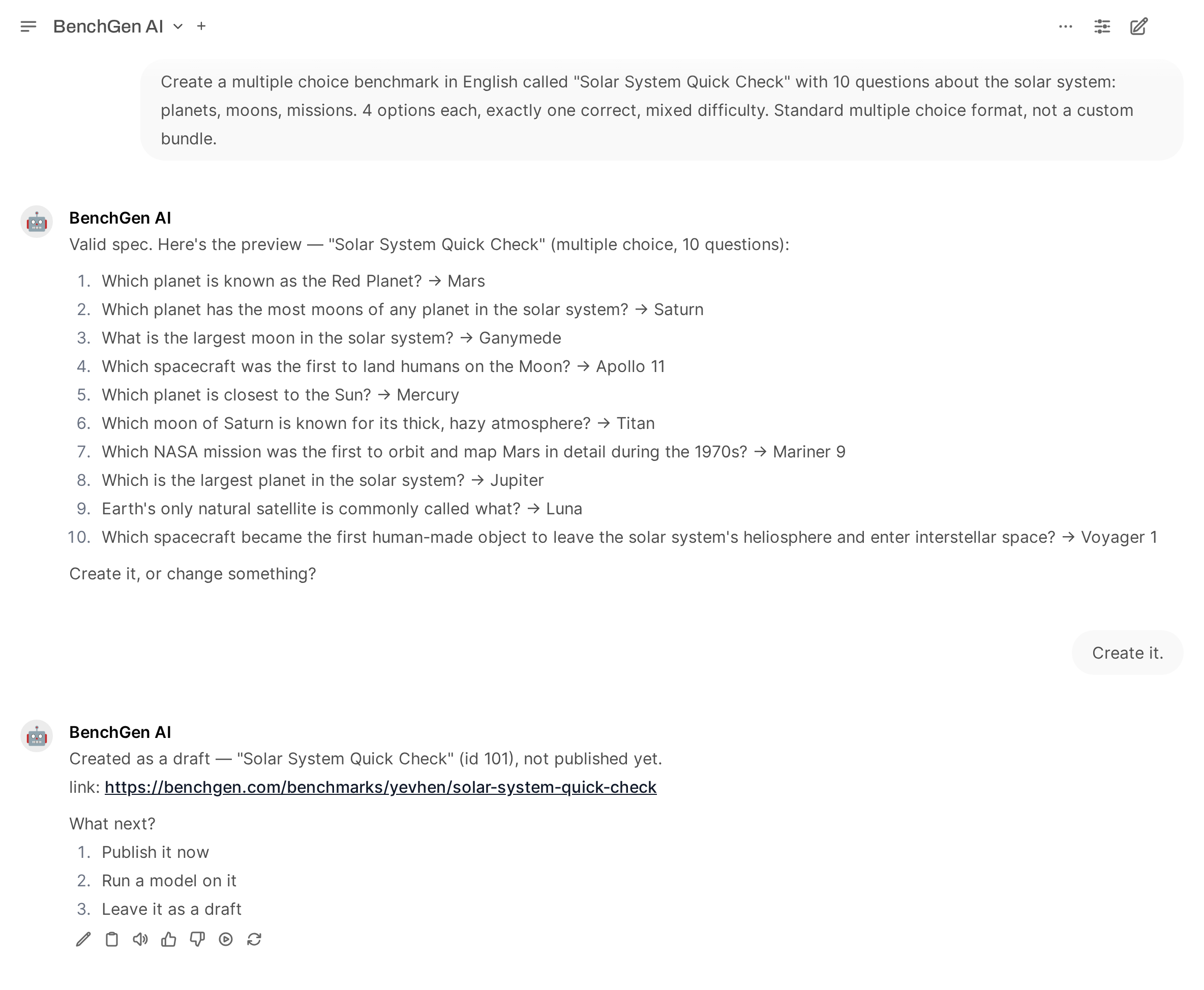 ## Prompts to try
```text theme={null}
Create a multiple choice benchmark called "Solar System Basics" with 30 questions about
planets, moons, orbits and missions. 4 options each, exactly one correct.
```
```text theme={null}
Create a benchmark that tests whether a model picks the right tool and the right arguments,
with 20 questions about a support agent's tools.
```
```text theme={null}
I have a benchmark bundle as a zip. Upload it and create a benchmark from it.
```
```text theme={null}
Create a benchmark from https://github.com/benchgen-ai/benchgen-benchmark-examples/tree/main/benchmarks/cat-care-basics
```
## What it will not do
* Create or publish anything without an explicit request
* Retry on its own. One create per confirmation, and a failure is reported rather than repeated
* Change an existing benchmark, or create a second one to fix a first
* Delete or unpublish anything
Creation is rate limited to 10 benchmarks a day and 3 a minute through the agent. The web app is
not limited.
## Related
The walkthrough, with screenshots and large benchmarks.
Put a model on what you just made.
What a custom format package contains.
Build a benchmark from a bundle in a git repository.
## Prompts to try
```text theme={null}
Create a multiple choice benchmark called "Solar System Basics" with 30 questions about
planets, moons, orbits and missions. 4 options each, exactly one correct.
```
```text theme={null}
Create a benchmark that tests whether a model picks the right tool and the right arguments,
with 20 questions about a support agent's tools.
```
```text theme={null}
I have a benchmark bundle as a zip. Upload it and create a benchmark from it.
```
```text theme={null}
Create a benchmark from https://github.com/benchgen-ai/benchgen-benchmark-examples/tree/main/benchmarks/cat-care-basics
```
## What it will not do
* Create or publish anything without an explicit request
* Retry on its own. One create per confirmation, and a failure is reported rather than repeated
* Change an existing benchmark, or create a second one to fix a first
* Delete or unpublish anything
Creation is rate limited to 10 benchmarks a day and 3 a minute through the agent. The web app is
not limited.
## Related
The walkthrough, with screenshots and large benchmarks.
Put a model on what you just made.
What a custom format package contains.
Build a benchmark from a bundle in a git repository.