> ## Documentation Index
> Fetch the complete documentation index at: https://benchgen.com/docs/llms.txt
> Use this file to discover all available pages before exploring further.
# RLVR Training
> Train with GRPO against a verifiable reward instead of a labeled dataset, then optionally automate rounds of train, benchmark, and retrain.
Fine-tuning isn't the only **Training Method**. Alongside **Supervised (SFT)**, which learns from labeled examples, Train also offers **Reinforcement (RLVR)**: the model generates its own answers and a reward function scores them, no labeled dataset required for two of the three reward functions.
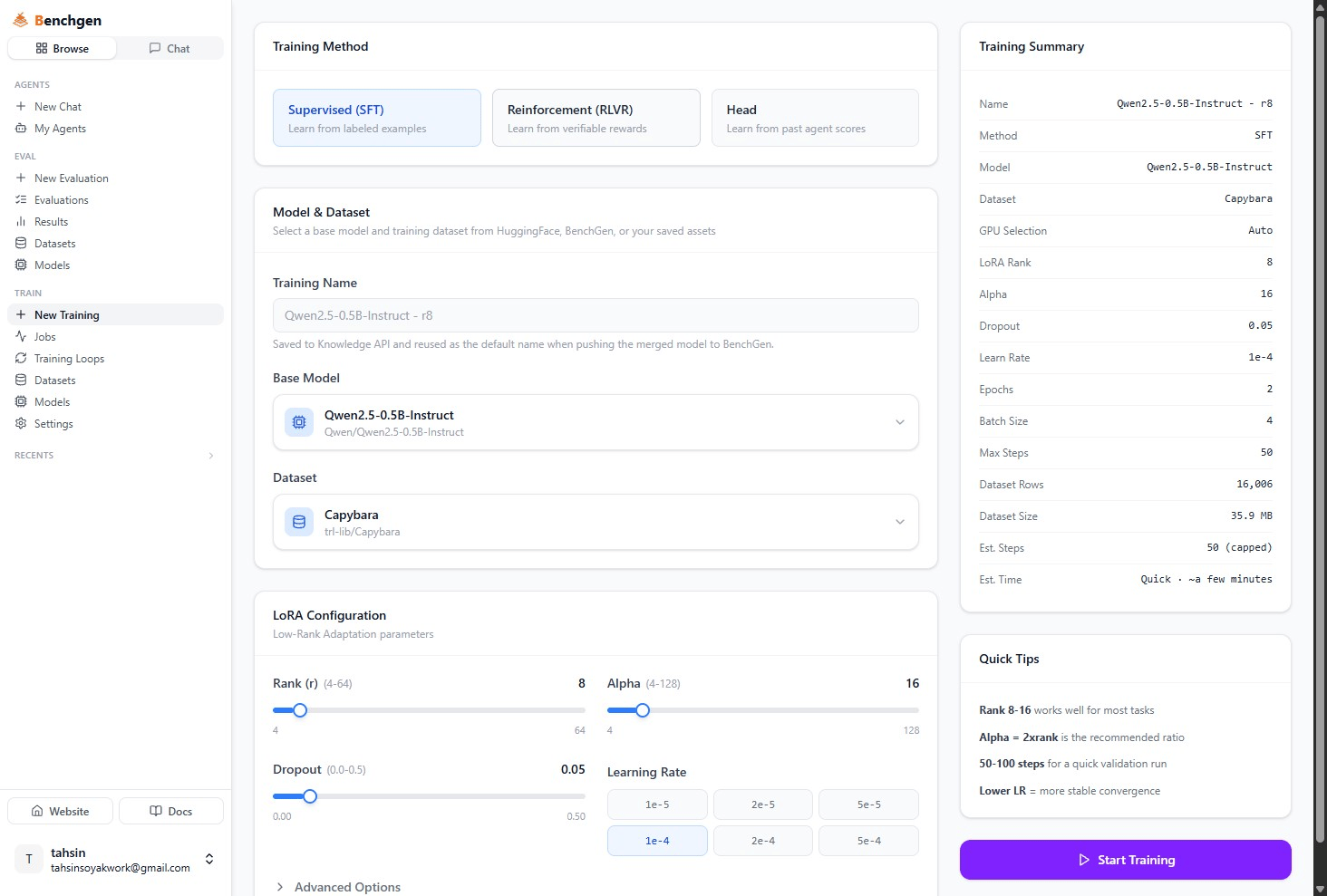 RLVR stands for **R**einforcement **L**earning from **V**erifiable **R**ewards. Under the hood it runs **GRPO** (Group Relative Policy Optimization) on top of a LoRA adapter: for each prompt, the model generates a group of candidate answers, the reward function scores each one, and the adapter is nudged toward whichever answers scored best relative to the rest of the group.
This page assumes you're already on the **New Training** form. If you haven't started one yet, see [Fine-tune a Model](/docs/train/fine-tune-a-model) for how to name a run and pick a base model, everything up to the Training Method choice works the same way.
## Pick a reward function
Selecting **Reinforcement (RLVR)** swaps the LoRA config card for a **Reward Function** card.
RLVR stands for **R**einforcement **L**earning from **V**erifiable **R**ewards. Under the hood it runs **GRPO** (Group Relative Policy Optimization) on top of a LoRA adapter: for each prompt, the model generates a group of candidate answers, the reward function scores each one, and the adapter is nudged toward whichever answers scored best relative to the rest of the group.
This page assumes you're already on the **New Training** form. If you haven't started one yet, see [Fine-tune a Model](/docs/train/fine-tune-a-model) for how to name a run and pick a base model, everything up to the Training Method choice works the same way.
## Pick a reward function
Selecting **Reinforcement (RLVR)** swaps the LoRA config card for a **Reward Function** card.
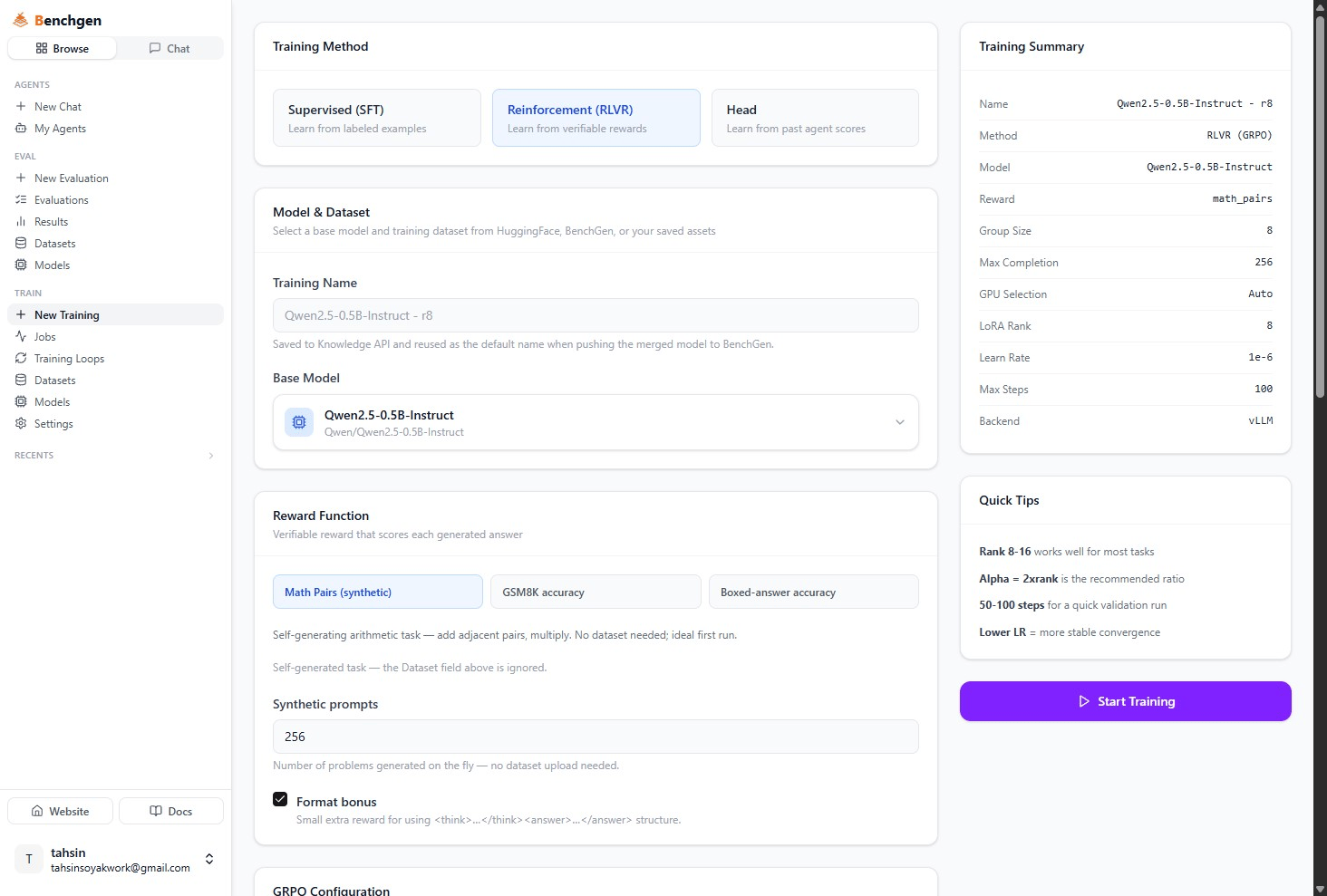 | Reward | What it scores | Needs a dataset? |
| -------------------------- | ------------------------------------------------------------------------------------------------------------------------------------- | ------------------------------------------------------------------ |
| **Math Pairs (synthetic)** | A self-generating arithmetic task, adding adjacent pairs, multiplying, correct final number wins. No dataset needed, ideal first run. | No, self-generated |
| **GSM8K accuracy** | Grade-school word problems from the built-in `openai/gsm8k` dataset. Rewards the correct final number. | No, uses the built-in dataset (the Dataset field above is ignored) |
| **Boxed-answer accuracy** | Any HuggingFace dataset with a `prompt` and a `ground_truth` column. Rewards a correct `\boxed{...}` final answer. | Yes, pick one in the Dataset field above |
Picking **Math Pairs (synthetic)** reveals a **Synthetic prompts** field, how many problems to generate on the fly (8–100,000, default `256`), no dataset upload needed either way.
Whichever reward you pick, **Format bonus** is checked by default: a small extra reward for wrapping the answer in `……` structure, on top of whether the answer itself was correct.
## Configure GRPO
Below the reward, the **GRPO Configuration** card sets how the group-based training itself runs.
| Reward | What it scores | Needs a dataset? |
| -------------------------- | ------------------------------------------------------------------------------------------------------------------------------------- | ------------------------------------------------------------------ |
| **Math Pairs (synthetic)** | A self-generating arithmetic task, adding adjacent pairs, multiplying, correct final number wins. No dataset needed, ideal first run. | No, self-generated |
| **GSM8K accuracy** | Grade-school word problems from the built-in `openai/gsm8k` dataset. Rewards the correct final number. | No, uses the built-in dataset (the Dataset field above is ignored) |
| **Boxed-answer accuracy** | Any HuggingFace dataset with a `prompt` and a `ground_truth` column. Rewards a correct `\boxed{...}` final answer. | Yes, pick one in the Dataset field above |
Picking **Math Pairs (synthetic)** reveals a **Synthetic prompts** field, how many problems to generate on the fly (8–100,000, default `256`), no dataset upload needed either way.
Whichever reward you pick, **Format bonus** is checked by default: a small extra reward for wrapping the answer in `……` structure, on top of whether the answer itself was correct.
## Configure GRPO
Below the reward, the **GRPO Configuration** card sets how the group-based training itself runs.
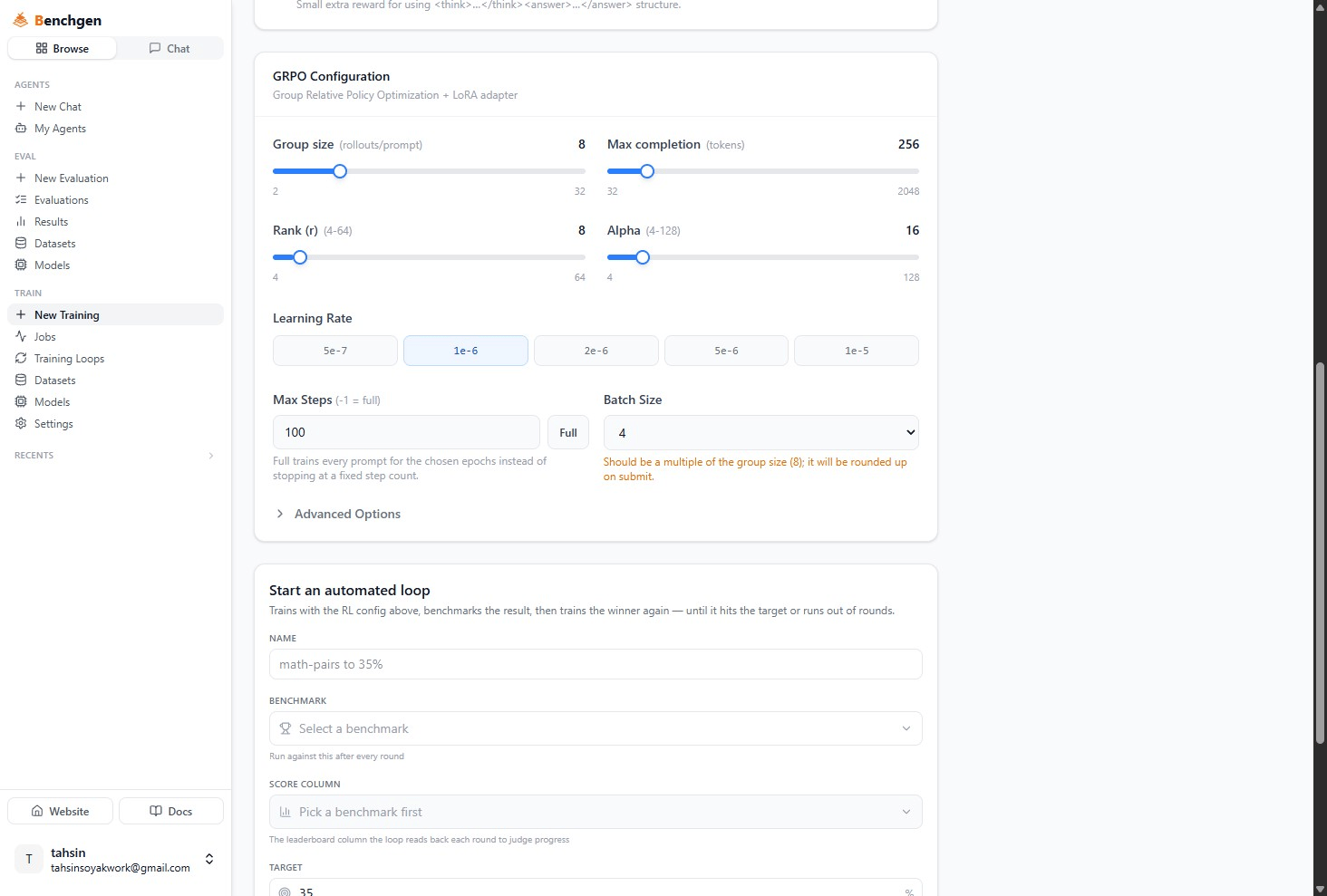 | Parameter | Range | Default | What it controls |
| ------------------ | -------------------- | ------- | ----------------------------------------------------------------------------------------------------- |
| **Group size** | 2–32 | `8` | Rollouts generated per prompt, this is the "group" GRPO compares against itself. |
| **Max completion** | 32–2048 tokens | `256` | Cap on how long each generated answer can be. |
| **Rank (r)** | 4–64 | `8` | LoRA adapter capacity, same meaning as in SFT. |
| **Alpha** | 4–128 | `16` | LoRA scaling factor. |
| **Learning Rate** | `5e-7` to `1e-5` | `1e-6` | Deliberately lower than SFT's range, RL updates are noisier. |
| **Max Steps** | `-1` = full | `100` | Click **Full** to train every prompt for the chosen epochs instead of stopping at a fixed step count. |
| **Batch Size** | `1, 2, 4, 8, 16, 32` | `4` | Examples per gradient step. |
Batch Size should be a multiple of Group size. If it isn't, for example the default Batch Size `4` against a Group size of `8`, the form shows a warning and rounds it up for you on submit. You can ignore the warning and let it round up, or pick a multiple yourself.
Expand **Advanced Options** for finer control: **Loss Type** (`grpo`, `dapo`, or `dr_grpo`), **Epochs**, **Quantization** (Full Precision, 4-bit QLoRA, or 8-bit), and **Generation Backend**, either **vLLM (colocate)** (fast, shares the training GPU) or **Transformers** (in-process, use if vLLM runs out of memory). Picking vLLM colocate also exposes a GPU memory slider controlling how much of the training GPU vLLM gets to keep for itself.
## Start training
The **Training Summary** sidebar mirrors an RLVR run's specific fields: **Method** (`RLVR (GRPO)`), **Model**, **Reward**, **Group Size**, **Max Completion**, **GPU Selection**, **LoRA Rank**, **Learn Rate**, **Max Steps**, and **Backend**. Click **Start Training** once it looks right.
## Monitor an RLVR run
An RLVR job's detail page adds an **RL Metrics** section above the usual Actions panel.
| Parameter | Range | Default | What it controls |
| ------------------ | -------------------- | ------- | ----------------------------------------------------------------------------------------------------- |
| **Group size** | 2–32 | `8` | Rollouts generated per prompt, this is the "group" GRPO compares against itself. |
| **Max completion** | 32–2048 tokens | `256` | Cap on how long each generated answer can be. |
| **Rank (r)** | 4–64 | `8` | LoRA adapter capacity, same meaning as in SFT. |
| **Alpha** | 4–128 | `16` | LoRA scaling factor. |
| **Learning Rate** | `5e-7` to `1e-5` | `1e-6` | Deliberately lower than SFT's range, RL updates are noisier. |
| **Max Steps** | `-1` = full | `100` | Click **Full** to train every prompt for the chosen epochs instead of stopping at a fixed step count. |
| **Batch Size** | `1, 2, 4, 8, 16, 32` | `4` | Examples per gradient step. |
Batch Size should be a multiple of Group size. If it isn't, for example the default Batch Size `4` against a Group size of `8`, the form shows a warning and rounds it up for you on submit. You can ignore the warning and let it round up, or pick a multiple yourself.
Expand **Advanced Options** for finer control: **Loss Type** (`grpo`, `dapo`, or `dr_grpo`), **Epochs**, **Quantization** (Full Precision, 4-bit QLoRA, or 8-bit), and **Generation Backend**, either **vLLM (colocate)** (fast, shares the training GPU) or **Transformers** (in-process, use if vLLM runs out of memory). Picking vLLM colocate also exposes a GPU memory slider controlling how much of the training GPU vLLM gets to keep for itself.
## Start training
The **Training Summary** sidebar mirrors an RLVR run's specific fields: **Method** (`RLVR (GRPO)`), **Model**, **Reward**, **Group Size**, **Max Completion**, **GPU Selection**, **LoRA Rank**, **Learn Rate**, **Max Steps**, and **Backend**. Click **Start Training** once it looks right.
## Monitor an RLVR run
An RLVR job's detail page adds an **RL Metrics** section above the usual Actions panel.
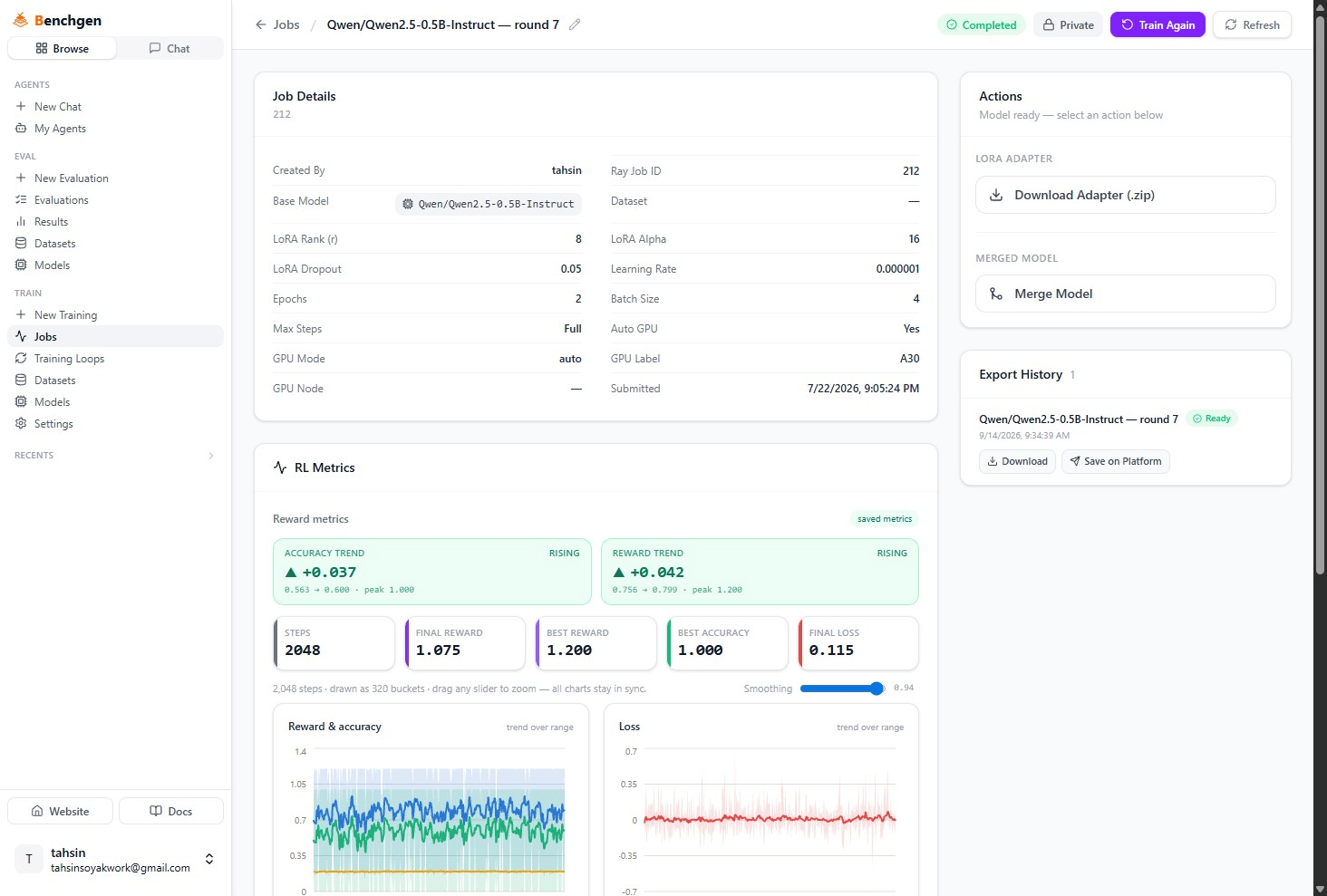 * **Accuracy Trend** and **Reward Trend** compare an early window of training against a later one, showing the delta and the direction (rising, falling, flat), plus the peak value reached.
* The stat tiles, **Steps**, **Final Reward**, **Best Reward**, **Best Accuracy**, **Final Loss**, summarize the whole run once it's done.
* **Reward & accuracy** and **Loss** chart every step. If the run logged them, you may also see **KL & entropy** and **Completion length** charts below.
The **Actions** panel underneath, **Download Adapter**, **Merge Model**, **Export History**, works exactly like an SFT job's, see [Merge & Save a Model](/docs/train/merge-lora-adapter).
## Automate rounds with a training loop
Instead of babysitting one run, you can point Train at a target score and let it train, benchmark, and retrain the winner on its own. Configure your reward and GRPO settings as above, then scroll to **Start an automated loop**.
* **Accuracy Trend** and **Reward Trend** compare an early window of training against a later one, showing the delta and the direction (rising, falling, flat), plus the peak value reached.
* The stat tiles, **Steps**, **Final Reward**, **Best Reward**, **Best Accuracy**, **Final Loss**, summarize the whole run once it's done.
* **Reward & accuracy** and **Loss** chart every step. If the run logged them, you may also see **KL & entropy** and **Completion length** charts below.
The **Actions** panel underneath, **Download Adapter**, **Merge Model**, **Export History**, works exactly like an SFT job's, see [Merge & Save a Model](/docs/train/merge-lora-adapter).
## Automate rounds with a training loop
Instead of babysitting one run, you can point Train at a target score and let it train, benchmark, and retrain the winner on its own. Configure your reward and GRPO settings as above, then scroll to **Start an automated loop**.
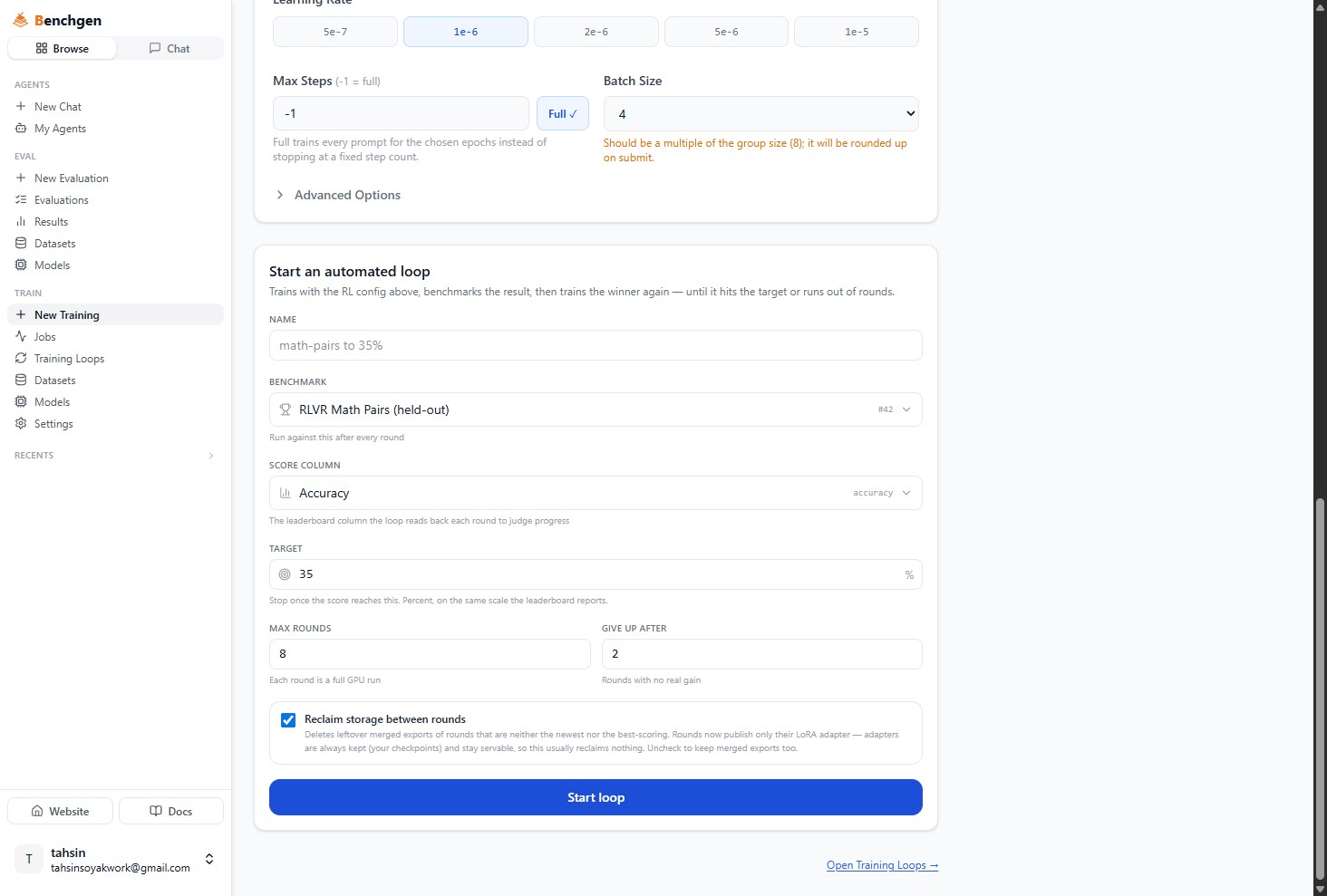 | Field | What it does |
| ---------------------------------- | ---------------------------------------------------------------------------------------------------------------------------------------------------------------------------------------------------------------- |
| **Name** | Labels the loop, for example `math-pairs to 35%`. |
| **Benchmark** | Which environment scores each round, run against it after every round. |
| **Score Column** | The leaderboard column the loop reads back each round to judge progress, resets when you change the benchmark. |
| **Target** | Stop once the score reaches this percent, on the same scale the leaderboard reports. |
| **Max Rounds** | Upper bound on rounds, each one is a full GPU run. |
| **Give Up After** | Stop early if this many rounds in a row show no real gain. |
| **Reclaim storage between rounds** | On by default. Rounds only ever publish their LoRA adapter, adapters are always kept and stay servable, so this usually reclaims nothing in practice. Uncheck it if a round's merged export should also survive. |
Each round trains a fresh GRPO adapter on top of the previous round's best result, benchmarks it, and either stops (target reached, rounds spent, or plateaued) or starts the next round automatically. Click **Start loop**.
## Reading loop results
Open the loop from **Training Loops** in the sidebar to see it live or after it finishes.
| Field | What it does |
| ---------------------------------- | ---------------------------------------------------------------------------------------------------------------------------------------------------------------------------------------------------------------- |
| **Name** | Labels the loop, for example `math-pairs to 35%`. |
| **Benchmark** | Which environment scores each round, run against it after every round. |
| **Score Column** | The leaderboard column the loop reads back each round to judge progress, resets when you change the benchmark. |
| **Target** | Stop once the score reaches this percent, on the same scale the leaderboard reports. |
| **Max Rounds** | Upper bound on rounds, each one is a full GPU run. |
| **Give Up After** | Stop early if this many rounds in a row show no real gain. |
| **Reclaim storage between rounds** | On by default. Rounds only ever publish their LoRA adapter, adapters are always kept and stay servable, so this usually reclaims nothing in practice. Uncheck it if a round's merged export should also survive. |
Each round trains a fresh GRPO adapter on top of the previous round's best result, benchmarks it, and either stops (target reached, rounds spent, or plateaued) or starts the next round automatically. Click **Start loop**.
## Reading loop results
Open the loop from **Training Loops** in the sidebar to see it live or after it finishes.
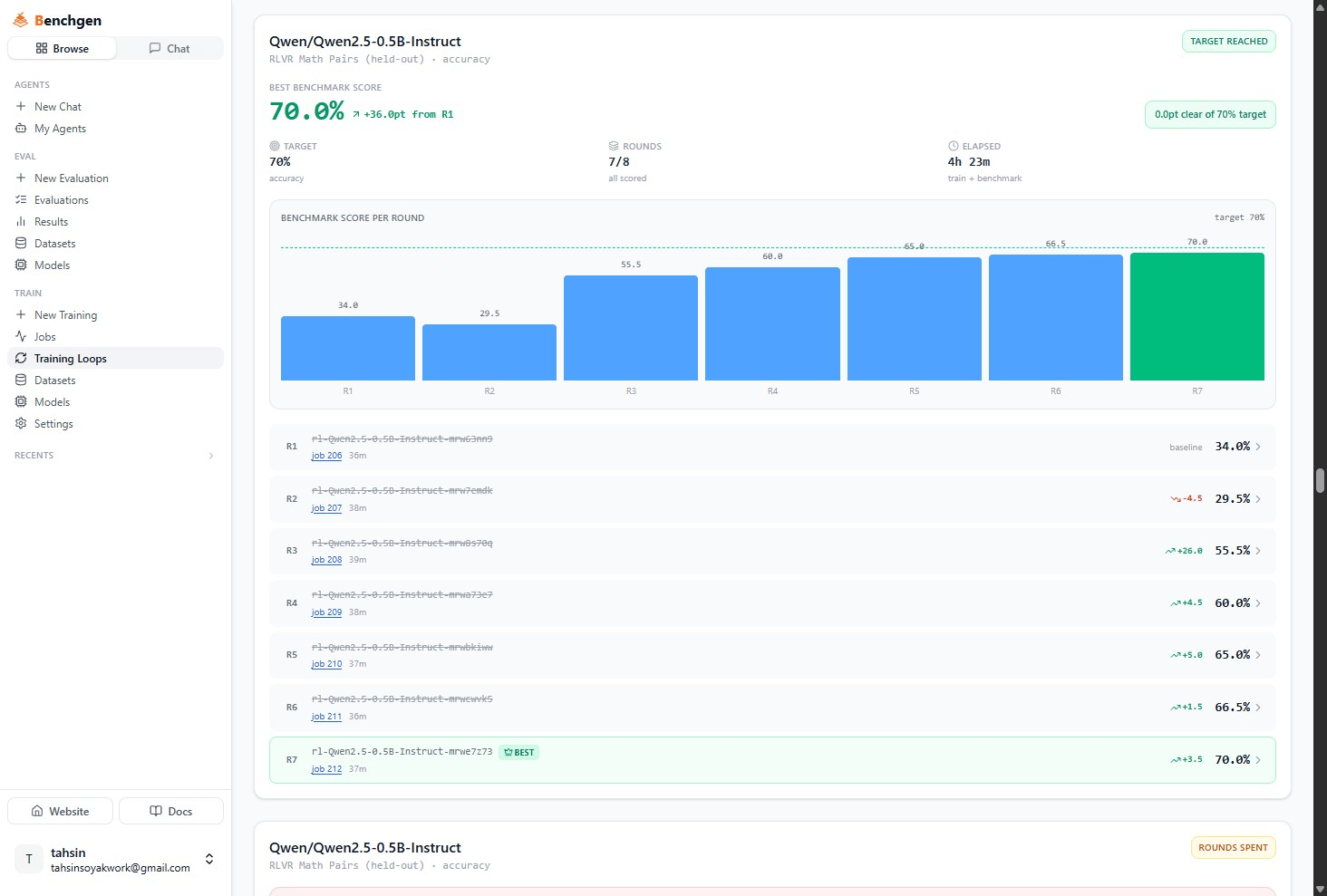 The header stats show the **best benchmark score** reached so far (with its gain over round 1), the **target**, how many of the **max rounds** have run, and total **elapsed** time across training and benchmarking. The bar chart plots score per round, and each row below links to that round's training job, its duration, and its score with a delta arrow against the previous scored round. The round with the best score gets a **BEST** badge, ties go to the earlier round.
A loop's overall status shows as **Queued**, **Training**, **Benchmarking**, **Target reached**, **Rounds spent**, **Plateaued**, **Failed**, or **Stopped**.
## Evaluating an RLVR model
An RLVR-trained model benchmarks the same way as any other, see [On a Platform Model](/docs/eval/run-a-benchmark-platform). The Score Breakdown just reflects whatever the reward measured during training:
The header stats show the **best benchmark score** reached so far (with its gain over round 1), the **target**, how many of the **max rounds** have run, and total **elapsed** time across training and benchmarking. The bar chart plots score per round, and each row below links to that round's training job, its duration, and its score with a delta arrow against the previous scored round. The round with the best score gets a **BEST** badge, ties go to the earlier round.
A loop's overall status shows as **Queued**, **Training**, **Benchmarking**, **Target reached**, **Rounds spent**, **Plateaued**, **Failed**, or **Stopped**.
## Evaluating an RLVR model
An RLVR-trained model benchmarks the same way as any other, see [On a Platform Model](/docs/eval/run-a-benchmark-platform). The Score Breakdown just reflects whatever the reward measured during training:
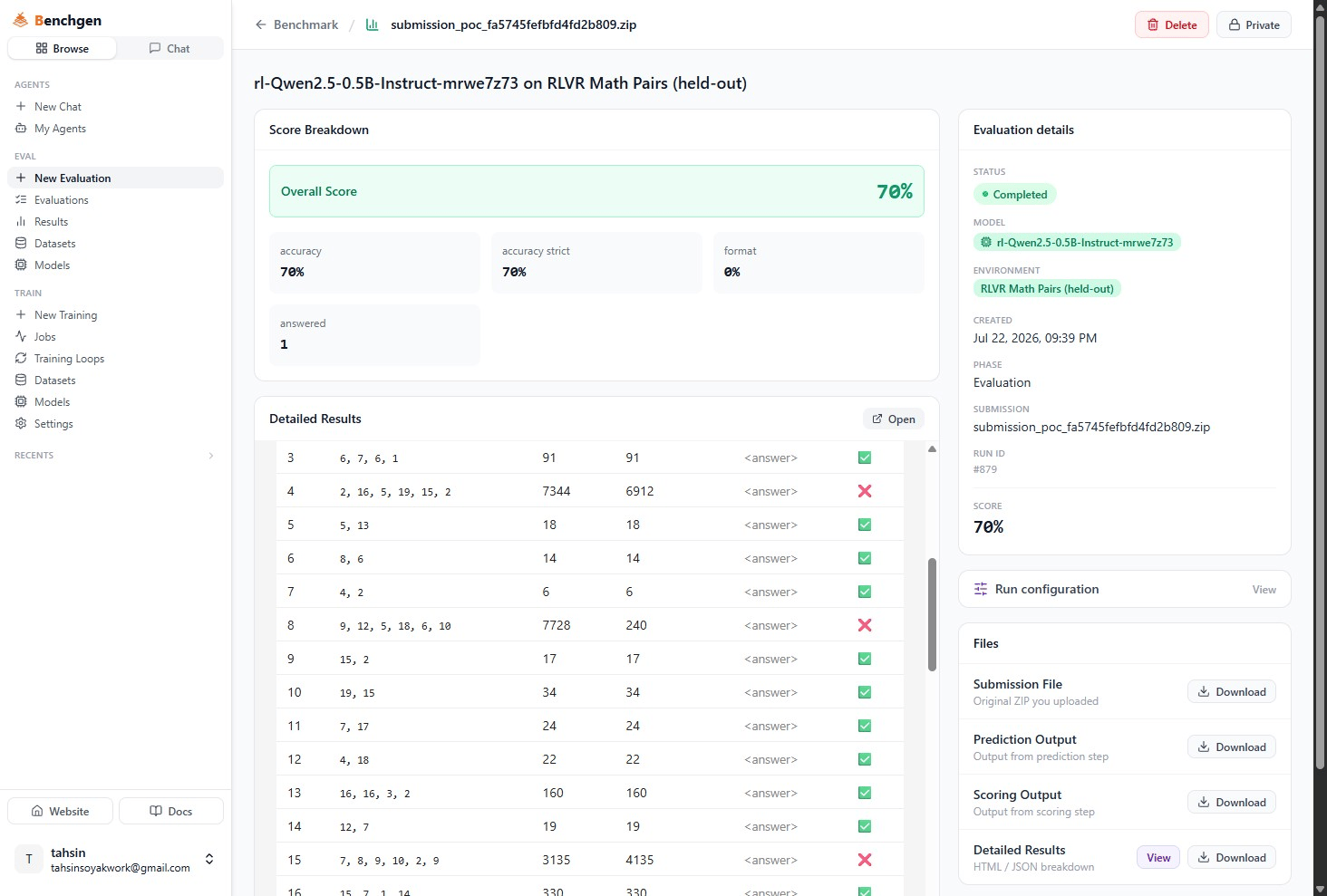 **accuracy** and **accuracy strict** mirror the reward function's own scoring, **format** reflects the `/` format bonus, and **answered** counts responses the model actually completed. See [Benchmark Results](/docs/eval/read-results) for how to read the rest of this page.
## Next Steps
Download the adapter, save it to run in benchmarks, or merge it into a full checkpoint.
Train on a labeled dataset with Supervised (SFT) instead.
**accuracy** and **accuracy strict** mirror the reward function's own scoring, **format** reflects the `/` format bonus, and **answered** counts responses the model actually completed. See [Benchmark Results](/docs/eval/read-results) for how to read the rest of this page.
## Next Steps
Download the adapter, save it to run in benchmarks, or merge it into a full checkpoint.
Train on a labeled dataset with Supervised (SFT) instead.