

.zip file. BenchGen unpacks it, reads the competition.yaml at the root, and assembles the environment from the files declared there.
Top-level layout
competition.yaml.
Folders work in place of the inner zips. Anywhere competition.yaml names
a .zip, it can instead name a folder, and BenchGen zips it for you while
unpacking. This layout is equivalent to the one above and is usually easier to
write and review:
competition.yaml itself must sit in the zip root.
The two screenshots below show what a real code submission bundle (left) and dataset submission bundle (right) look like on disk:
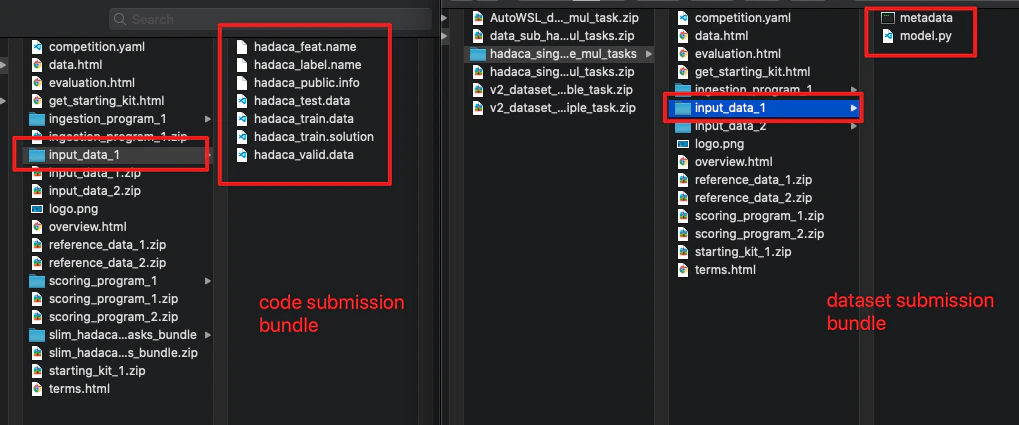
Code submission bundle vs dataset submission bundle — top-level structure
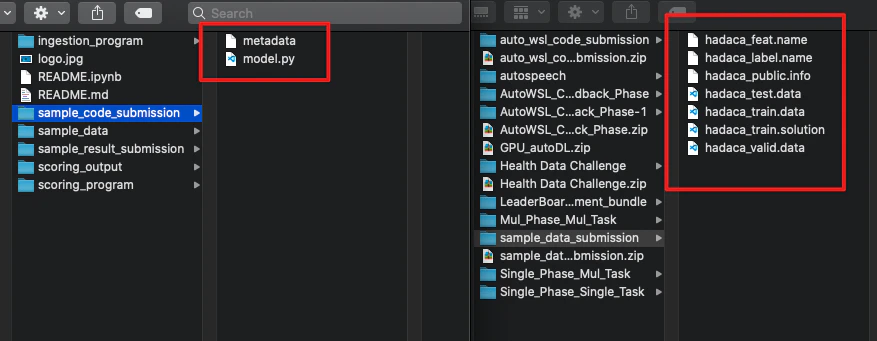
Code submission and dataset submission contents
Files explained
competition.yaml
The only required file at the root. It defines the environment’s metadata, tasks, phases, and leaderboard. Every other file in the bundle is referenced from here.
See the YAML reference for a full field-by-field breakdown.
Reference data (reference_data.zip)
The ground-truth answers your scoring program uses to judge a model’s outputs. Only the scoring program reads this file — it is never exposed to the model being evaluated.
Reference data can be anything your scoring program can parse: CSV rows, JSON objects, plain text labels, or structured prediction targets. The format is entirely up to you as long as your scoring program can read it.
Scoring program (scoring_program.zip)
The script that decides whether a model’s output is correct. BenchGen runs this after every submission.
The zip must contain:
- Your scoring script (e.g.
scoring.py) - A
metadata.yamlthat specifies the command used to run it
metadata.yaml example:
Your script must write a
scores.json to /app/output/:
competition.yaml. Any additional keys are ignored.
Ingestion program (ingestion_program.zip) — optional
An ingestion program is needed when BenchGen runs the model end-to-end as part of the evaluation rather than receiving pre-generated outputs. It takes input data, calls the model, and writes predictions that the scoring program then evaluates.
The zip must contain your ingestion script and a metadata.yaml file at the root of the folder:

Ingestion program folder containing metadata file
metadata.yaml.
metadata.yaml example:
The argument order in
metadata.yaml differs depending on your submission mode. In code submission mode the model code is $submission_program; in dataset submission mode the dataset is $submission_program and your sample code becomes $input:
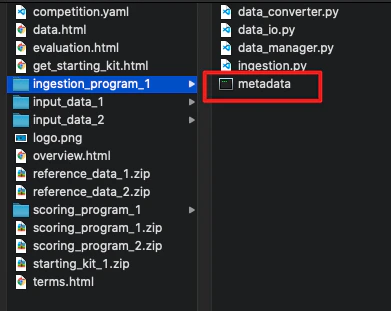
Ingestion program metadata command — code submission vs dataset submission
How the model reaches your ingestion program
For an LLM benchmark you do not write the model, and neither does the person running it. When a run starts, BenchGen generates amodel.py already
configured with the endpoint, credentials, model name and sampling settings
for the model under evaluation, and mounts it at /app/ingested_program/.
Your ingestion program imports it:
These class names all refer to the same implementation, so a bundle written
against any of them keeps working:
Model, GSM8KModel, MKQAModel,
TQuADModel, BilmeceModel, VisionModel, TurkishLanguageModel,
TurkishGrammarModel, TwentyQuestionsModel, MMLUModel, SWEModel.
Prefer Model.
Input data (input_data.zip) — optional
The test inputs handed to the ingestion program at run time. This is typically the prompt set, test features, or context documents your model needs to generate predictions. It is separate from the reference data so that the evaluation remains blind — the model sees inputs but never the answers.
Building one from zero
In order, with the reason each step exists:- Decide what one item looks like, and write
phase/input_data/items.jsonas a list of objects each with anidand whatever the model needs to see. Write the answers asphase/reference_data/items.json, each with the sameid. The two files are matched byid, never by position. - Write the ingestion program against the contract above: read the input
items, call
model.call_llm(...)for each, write the answers to/app/output/. Keep it dull. - Write the scoring program: read predictions from
/app/input/res/and answers from/app/input/ref/, decide what counts as correct, writescores.jsonto/app/output/. - Name the metrics in
competition.yaml. Every leaderboard columnkeymust be a key your scoring program actually writes intoscores.json. A column whose key is never written stays empty forever, with no error anywhere. Change the two together or neither. - Point
competition.yamlat every file:image,terms, each page, and each task’s programs and data. Anything it names that the zip does not hold is refused at upload. - Zip the contents, not the folder. See the warning at the end of this page.
- Dry run it with
?dry_run=1before creating anything, and read thewarningsas well as the errors.
Validation
When you upload a bundle, BenchGen checks:competition.yamlis present at the root and parses without errors- All files referenced in
competition.yamlexist inside the zip - The scoring program zip contains a
metadata.yamlwith acommandkey - Leaderboard column keys in
competition.yamlmatch at least one key expected inscores.json
Upload from a script or an agent
Besides the upload screen, you can send a bundle straight to the API in one request withPOST /api/competitions/create_from_bundle/ (multipart/form-data,
the zip in the bundle field, benchmark:create scope). Add ?dry_run=1 to
check a bundle without creating anything. The
API reference covers the endpoint and the token
scopes it needs.
Before it stores anything, the API checks the archive and then the manifest.
It refuses a bundle that is not a zip, has no competition.yaml in the root,
has no title in that file, is larger than 512 MB, unpacks to more than 2 GB,
holds more than 10000 files, compresses far beyond what real content does, or
carries entries that would escape the extract folder.
It then reads competition.yaml and refuses a bundle that names something the
zip does not hold: no image or an image that is not there, no terms or an
empty terms file, no pages or a page file that is missing or empty, no
tasks, a task with no index or no scoring program, a task pointing at data
that is neither in the zip nor the key of an existing dataset, or no phases.
A task reference may be a dataset UUID instead of a path, and a folder
reference resolves through the files under it, so neither is refused.
Both the dry run and the real create also answer with warnings, which never
block creation. They tell you about a leaderboard column key that no scoring
program appears to write, so that column would stay empty; placeholder text
left in the title or description; an empty image; and a manifest with no pages
at all. Read them before you create: nothing later will mention them again.
Anything past that is reported through creation_status while the bundle is
unpacked, for example a bad phase date or a docker image the platform cannot
run.
Next steps
YAML Reference
All fields in
competition.yaml.Create a Custom Environment
End-to-end upload walkthrough.